Structured Analysis PDF Guide for Students
Build a structured analysis pdf from any lecture: method picker, templates, a worked example, and source checks.

Most advice about a structured analysis PDF starts with summarizing the lecture and making the result look tidy. That's the wrong starting point. A polished summary can hide a missing qualification, an unsupported connection, or a table that was extracted in the wrong order.
Start by deciding what the PDF must help you do. Then build a model with named relationships and source locations, so you can revise from it without confusing your interpretation with what the lecturer said.
Table of Contents
- Structured Analysis PDF Method Picker
- What a Structured Analysis PDF Is
- Notation Families and the Four Elements
- When the Source PDF Is Structurally Unsafe
- Cross-References and Evidence Labels
- How to Build the PDF from a Lecture
- Worked Example from a Memory Lecture
- Export the Cited Study PDF
Structured Analysis PDF Method Picker
Before you write, choose the study job. Are you explaining a system, comparing authors, following a procedure, or preparing to answer exam questions? Those jobs need different structures, even when they come from the same lecture.
Use one primary method for the body of your PDF. A mixed collection of summaries, diagrams, and practice questions makes it harder to see whether you've completed the actual analysis.
Choose the method by the task
Which structured analysis method the PDF should use
| Study job | Method | PDF sections | Stop rule |
|---|---|---|---|
| Process or systems lecture | Context diagram then leveled DFDs | Boundary, processes, flows, stores, dictionary | Every process has one clear function |
| Competing theories or authors | Comparison matrix | Criteria, sources, verdict | Every cell has a page or timestamp |
| Author argument | Argument map | Claim, evidence, warrant, rebuttal | Each claim is supported or marked as a gap |
| Lab, clinical, or safety procedure | Numbered procedure | Inputs, steps, checks, exceptions | A peer could perform it from the PDF alone |
| Exam preparation | Question bank | Prompt, answer, source, confidence | High-risk items are verified against the source |
| Paper or chapter | Structured abstract | Purpose, method, findings, limits | Limits and what was not found are explicit |
The stop rule matters as much as the method. Without it, you can spend an evening adjusting shapes while leaving the central question unanswered.
Say your nursing lecture compares explanations of patient behavior. Use a comparison matrix with criteria such as assumptions, supporting observations, and limitations. Don't force the theories into a process diagram just because arrows look more analytical than a table.
For an author's argument, separate evidence from the warrant, the reasoning that connects the evidence to the claim. If the author jumps from an observation to a conclusion without explaining that connection, mark the gap rather than supplying a convincing argument on their behalf.
Keep supporting material subordinate
A procedure needs enough detail for another student to follow the sequence, recognize a failed check, and find the exception. For clinical or safety material, that completeness test concerns the study document. It isn't permission to perform an unfamiliar task without supervision or the applicable instructions.
A question bank serves a different purpose. Its answer cells should help you retrieve and explain the material, not reproduce a paragraph you can recognize but can't use.
Practical rule: Put the primary method in the body. Put supporting methods in a short cross-reference appendix.
For example, a systems PDF can end with practice questions that point back to particular process boxes. The questions support the model rather than becoming a competing set of notes.
Every method still needs the same front matter: title, course, source, date, and a sentence stating the question the lecture answers. Name the actual recording, chapter, or handout. A file called revision notes won't tell you which version of the class material you used.
What a Structured Analysis PDF Is
A structured analysis PDF is a repeatable model of lecture material, organized so you can inspect its parts and relationships. It isn't a shorter retelling of what happened in class.
Suppose a lecturer explains how a clinic handles appointment requests. A transcript preserves the spoken explanation, including digressions and repeated examples. A structured model separates the patient request, the booking activity, the appointment record, and the confirmation sent back to the patient.
That separation makes a useful question possible: what happens when the requested appointment isn't available? A smooth paragraph might leave that exception invisible.
The systems habit behind the study method
The University of Houston structured-analysis reading places the method's emergence in the mid-to-late 1970s, identifies Tom DeMarco's 1979 Structured Analysis and System Specification alongside related work by Edward Yourdon, Larry Constantine, Chris Gane, and Trish Sarson, and describes DFDs' influence during the 1980s and 1990s and their later incorporation into SSADM.
The practical concern was describing a complex information system before deciding how to implement it. Analysts needed to agree on what the system must do without getting distracted by software, hardware, or screen design.
Their central artifact was the data-flow diagram, or DFD. It represented inputs and outputs crossing a boundary, processes that transformed data, and stores that retained it.
The defining habit was hierarchical decomposition. Begin with the whole system in a context diagram, then open a process into more detailed diagrams until its functions can be specified clearly.
What students should preserve
For revision, the transferable discipline is more useful than the historical vocabulary:
- Hierarchy: Show which ideas belong under which larger claim or function.
- Shared terminology: Use the lecturer's meaning consistently, especially when everyday language differs.
- Directional relationships: Explain what passes between parts and in which direction.
- Assumptions: Separate what the lecture establishes from what it treats as given.
- Traceability: Keep a route from your representation back to the material.
Your study PDF can remain neutral about memorization. You might later turn its content into flashcards, explain it aloud, or write practice answers. Those are uses of the model, not substitutes for building it correctly.
A transcript paste preserves sequence without necessarily exposing structure. A paragraph summary compresses content without necessarily preserving relationships. A diagram with unlabeled arrows makes connections without explaining them.
Could another student find the source for each box without asking you what you meant?
Apply that test to any downloadable template. Attractive formatting doesn't compensate for boxes whose meaning or origin you can't recover.
Notation Families and the Four Elements
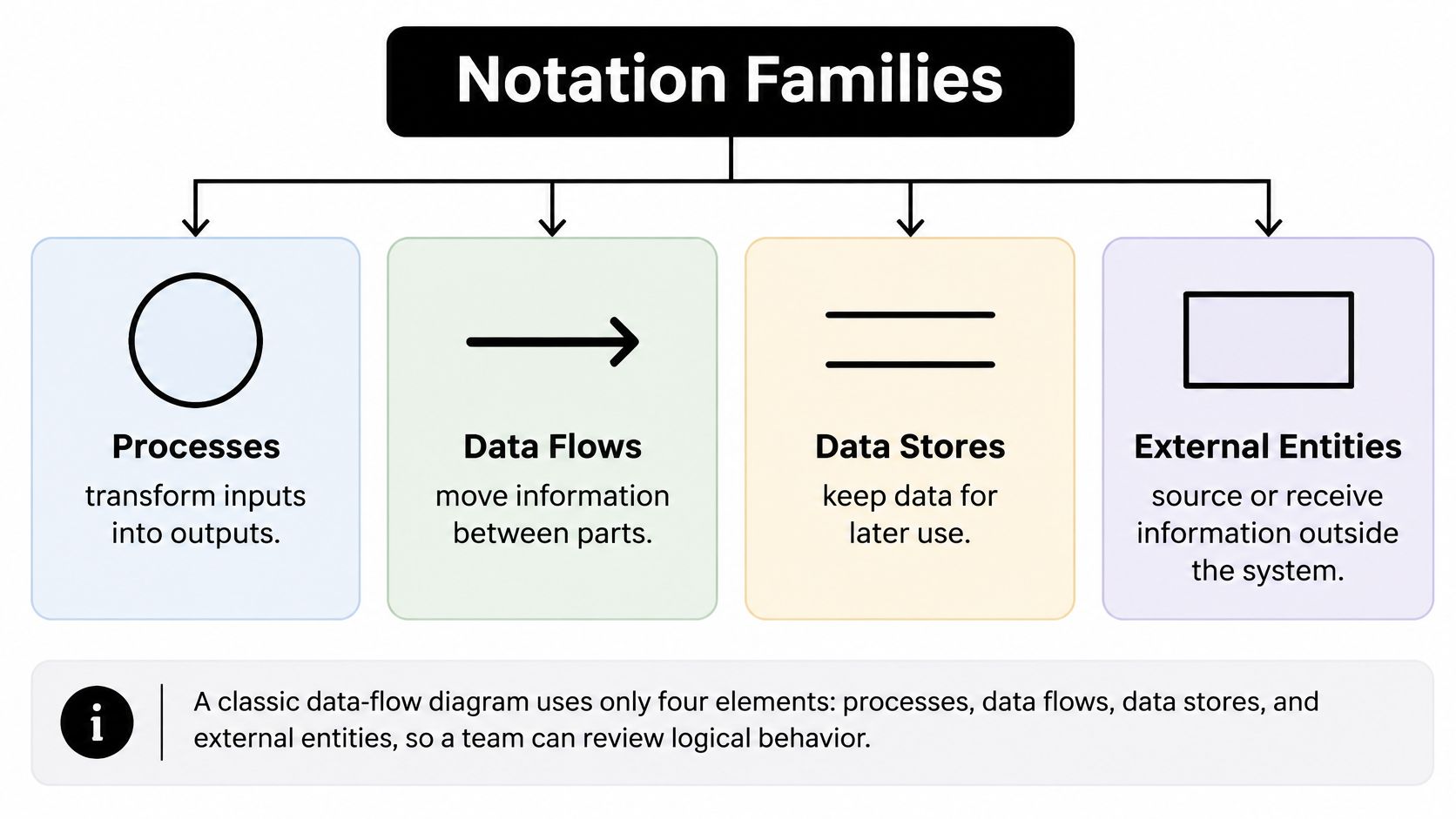
Learn the elements before choosing a symbol style. In a classic DFD, a process transforms inputs into outputs, a data flow carries data between parts, a data store retains data, and an external entity supplies or receives data outside the boundary.
The University of Toronto structured-modeling slides describe these four core elements and reference a 1981 ACM description of top-down logical modeling with four symbols, without specifying physical implementation.
Use the visual to distinguish what each element does before drawing your own model.
Choose a notation family deliberately
Notation families for a structured analysis PDF
| Family | Focus | PDF keeps | Use when |
|---|---|---|---|
| Classic structured analysis | Context diagram then leveled DFDs | Boundary, processes, flows, stores, dictionary | A process or systems lecture |
| SADT | Activity-oriented modeling | Activities with inputs, outputs, and controls | An activity breakdown |
| Gane and Sarson | Own notation and data access | Stores and how processes access them | Data-heavy systems readings |
| Ward and Mellor | Control flow and state | Control signals and states beside data flows | Real-time or event-driven behavior |
| Non-systems study map | Same four ideas, not a real DFD | Concept as process, term as store, causal link as flow, stakeholder as entity | Courses that are not information systems |
Don't mix notation families casually. If your lecturer uses a particular convention, follow it and include a legend where readers might otherwise misinterpret a symbol.
Every systems diagram also needs a data dictionary. If an arrow carries appointment details, the dictionary should explain what those details contain. Otherwise, different students may assume different contents while believing they agree about the flow.
Name the relationship, not just the topic
Use verbs for processes and nouns for stores and external entities. Validate request describes an activity; patient record names retained data; patient names an actor outside the booking system.
An arrow needs a label identifying what moves. Replace information with appointment request, availability result, or confirmation details. The label should help a reader explain why the receiving process needs that input.
For a non-systems course, these ideas are analogies, not formal notation rules. You might treat a concept as a process-like explanatory unit, a named term as a store-like reference, a causal link as a flow, and an author or stakeholder as an external entity. A concept doesn't literally transform data merely because you've drawn it in a process shape.
The same distinction helps when answering structured questions: identify the relationship the prompt requires rather than listing everything you know about its nouns.
A causal arrow is especially demanding. If a lecture says factors are associated, don't redraw that statement as one factor causing the other. Label the relationship at the strength the material supports.
The lasting value is disciplined decomposition and explicit relationships, not loyalty to a favorite symbol set. Drawing additional levels only helps when each level reveals something the reader needs to understand.
When the Source PDF Is Structurally Unsafe
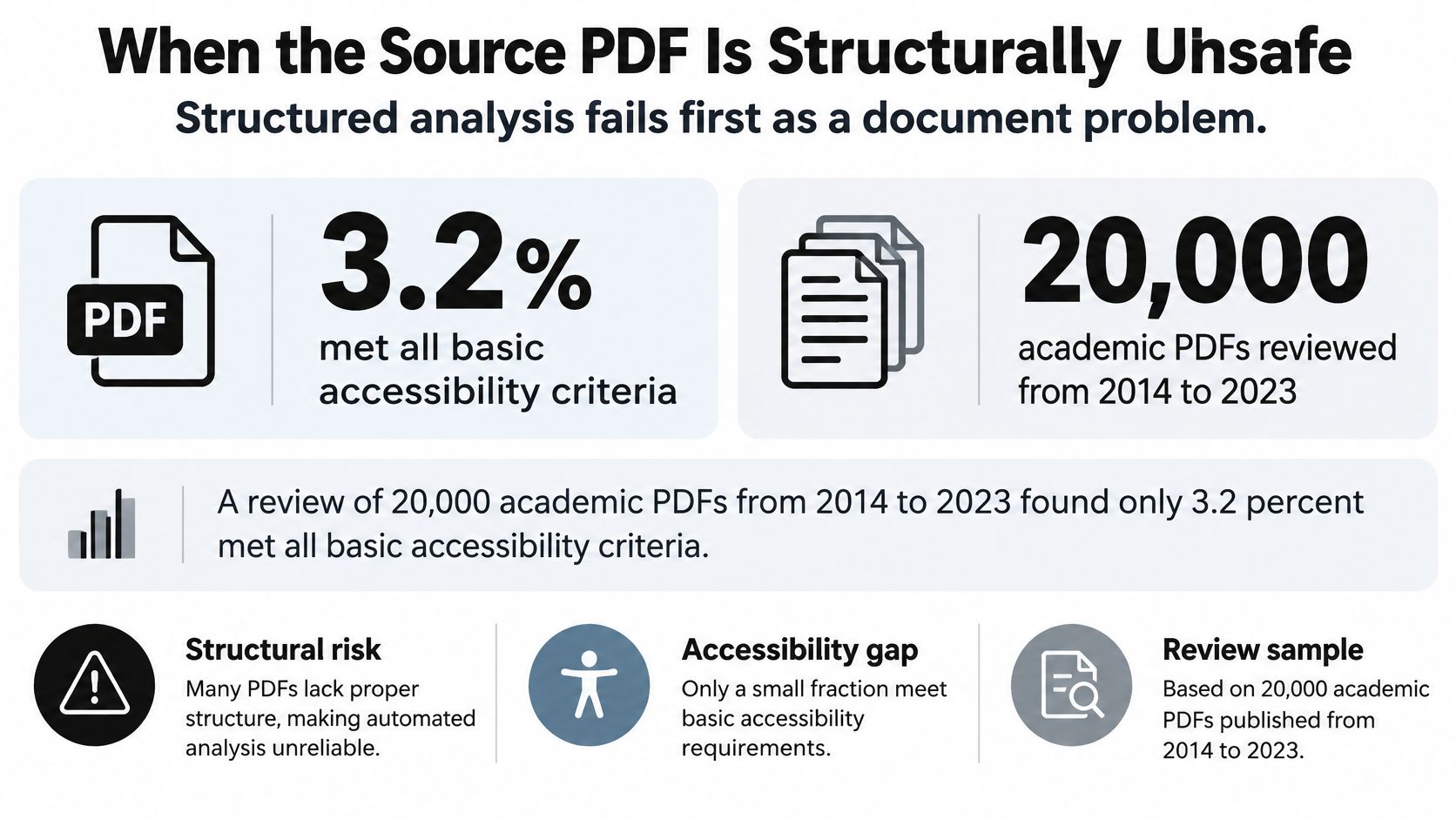
Structured analysis can fail before you begin reasoning. The accessibility reviews discussed by Langara's educational-technology accessibility resource found that only 3.2% of 20,000 academic PDFs published from 2014–2023 met all basic accessibility criteria, while 74.9% failed every criterion examined; a separate review of 18,627 PDFs found that 91% lacked tagged headings and 58% had no tags at all.
Those findings concern the reviewed documents, not a diagnosis of your particular handout. They do justify checking extraction instead of assuming readable pages produce dependable text.
The visual highlights the difference between a page that looks finished and a document that's ready for structured reuse.
How often academic PDFs fail structural checks
| Review | PDFs examined | Result |
|---|---|---|
| Academic PDFs published 2014-2023 | 20,000 | 3.2% met all basic accessibility criteria; 74.9% failed every criterion |
| Separate academic PDF review | 18,627 | 91% lacked tagged headings; 58% had no tags at all |
Check meaning as well as appearance
Missing structure can contribute to scrambled columns, detached table cells, and figures that disappear from text extraction. Missing tags alone don't prove that extraction failed, but successful text selection doesn't prove it worked either.
W3C's PDF accessibility guidance describes tagged PDF as a logical-structure framework for extracting and reusing content; PDF/UA-2 expects tags to reflect semantic purpose regardless of layout.
Before trusting a generated model, inspect:
- Document identity: Check the title and language.
- Navigation: Confirm that headings form a meaningful hierarchy.
- Visual meaning: Look for descriptions of meaningful images and genuine table structure.
- Reading behavior: Check link targets, reading order, and decorative headers or page numbers treated as artifacts.
OCR produces recognized text, not the equivalent of a properly tagged source. For a scanned handout, retain an explicit OCR label, a confidence note, and the detected page regions. If confidence information isn't available, say so rather than inventing a score.
Test the extraction against the page
Compare an extracted paragraph with the original, including any footnote. Then rebuild a table by columns and check that headings, values, and units still align.
For a chart without an accessible description, mark it as unseen by the text workflow until someone inspects the original. Don't infer a trend from its caption alone.
Use the video as a companion to checking your own document, not as evidence that extraction succeeded.

For nursing, construction, and occupational safety revision, treat diagrams and standards tables as high-risk material. Verify them on the original page before turning their contents into flashcards. A confidently phrased answer can't repair a value paired with the wrong column heading.
Cross-References and Evidence Labels
A source location tells you where to look. An evidence label tells you what kind of claim you're looking at. You need both, because a sentence can point to the correct page while overstating what that page supports.
Academic guidance discussed in Frontiers in Education emphasizes locating, reading, and verifying original publications when using AI summaries or concept maps, and checking generated references against scholarly search services and journal websites.
Use a fixed label set
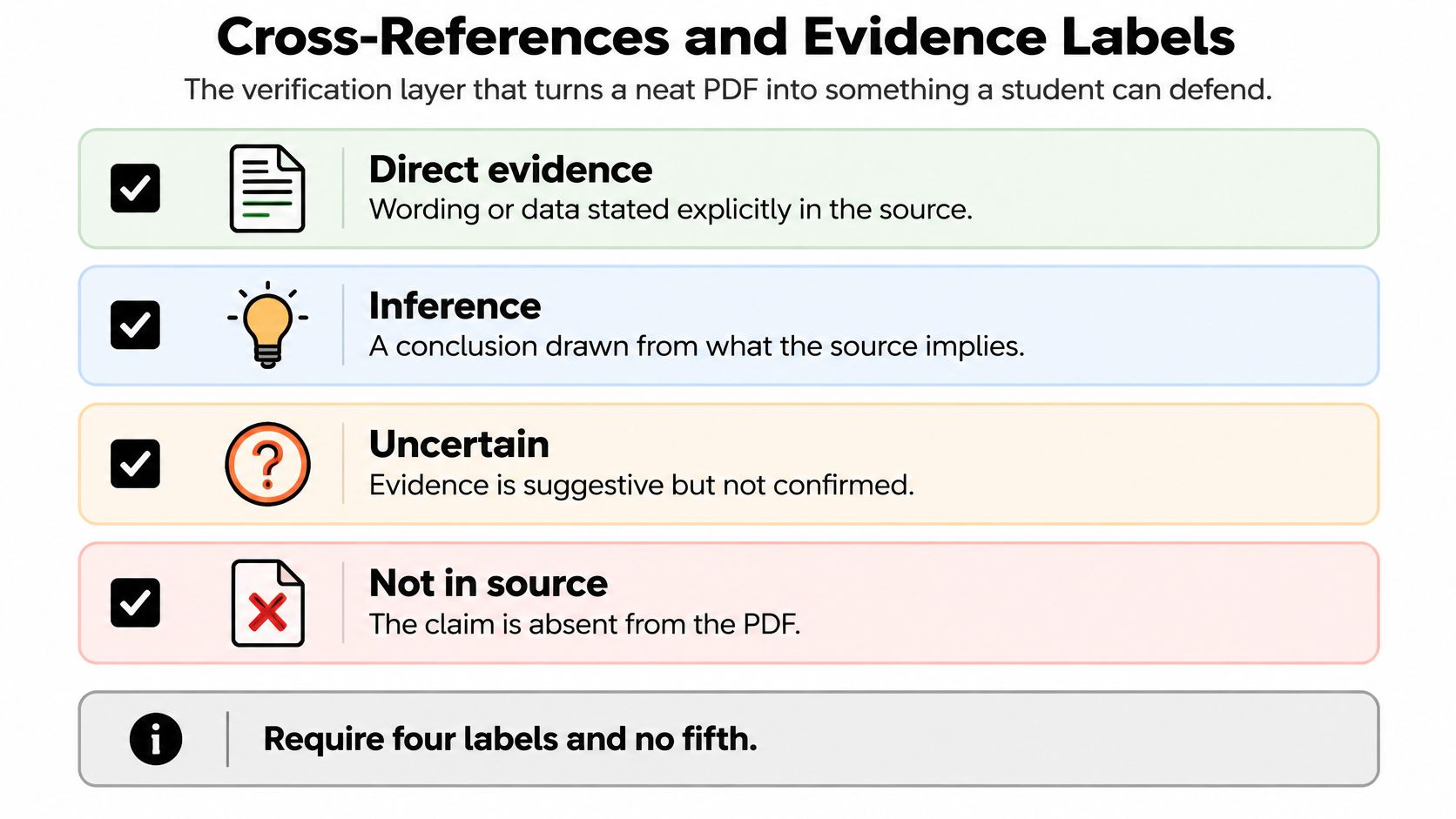
Use these labels for substantive statements, whether you wrote them yourself or generated a draft with AI:
- Direct evidence: The source explicitly states the claim. For example, your argument map records that the author rejects a proposed explanation, with the relevant passage attached.
- Inference: You supply the synthesis. For example, you conclude that the author's objections share a concern about measurement, while noting that the author doesn't use that framing.
- Uncertain: You can't yet establish the wording or interpretation. For example, a broken table makes it unclear which condition belongs to a result.
- Not in source: The requested fact is absent. For example, the lecture describes a procedure but never states the exception you're being asked about.
The label checklist keeps interpretation visible instead of blending it into fluent prose.
Not in source doesn't mean false. It means this file doesn't establish the claim. Likewise, uncertain isn't a softer synonym for probably correct.
Build a lookup path through the PDF
Give important objects stable identifiers. A process box can point to a dictionary entry, which points to a source location and then to a practice question.
For example, the following identifiers are a hypothetical cross-reference pattern, not citations to an actual lecture:
P3 → D3 → source page or lecture timestamp → Q3
If you revise the dictionary entry, you can find the affected process and question. That's much safer than maintaining disconnected versions of the same explanation.
Under each important claim, add a compact evidence strip:
- Support location: Record the page, slide, or timestamp and enough surrounding context to locate it.
- Wording owner: State whether the sentence expresses the lecturer's claim or your synthesis.
- Weakening evidence: Identify a qualification, exception, or conflicting passage that would narrow the conclusion.
This is also the difference between an objective summary and an interpretation that merely sounds neutral. Preserve the author's position before adding your explanation of it.
In nursing or safety revision, keep the qualifying condition beside the answer. A short statement can become misleading when separated from the population, circumstances, or exception that makes it valid.
Check references as well as claims. A plausible title isn't evidence that a publication exists or supports your sentence. No substantive unlabeled sentence belongs in the final PDF.
How to Build the PDF from a Lecture
Work from the lecture you just attended, not from a generic topic outline. Keep the recording, slides, and handout available together so you can resolve differences while the context is still familiar.
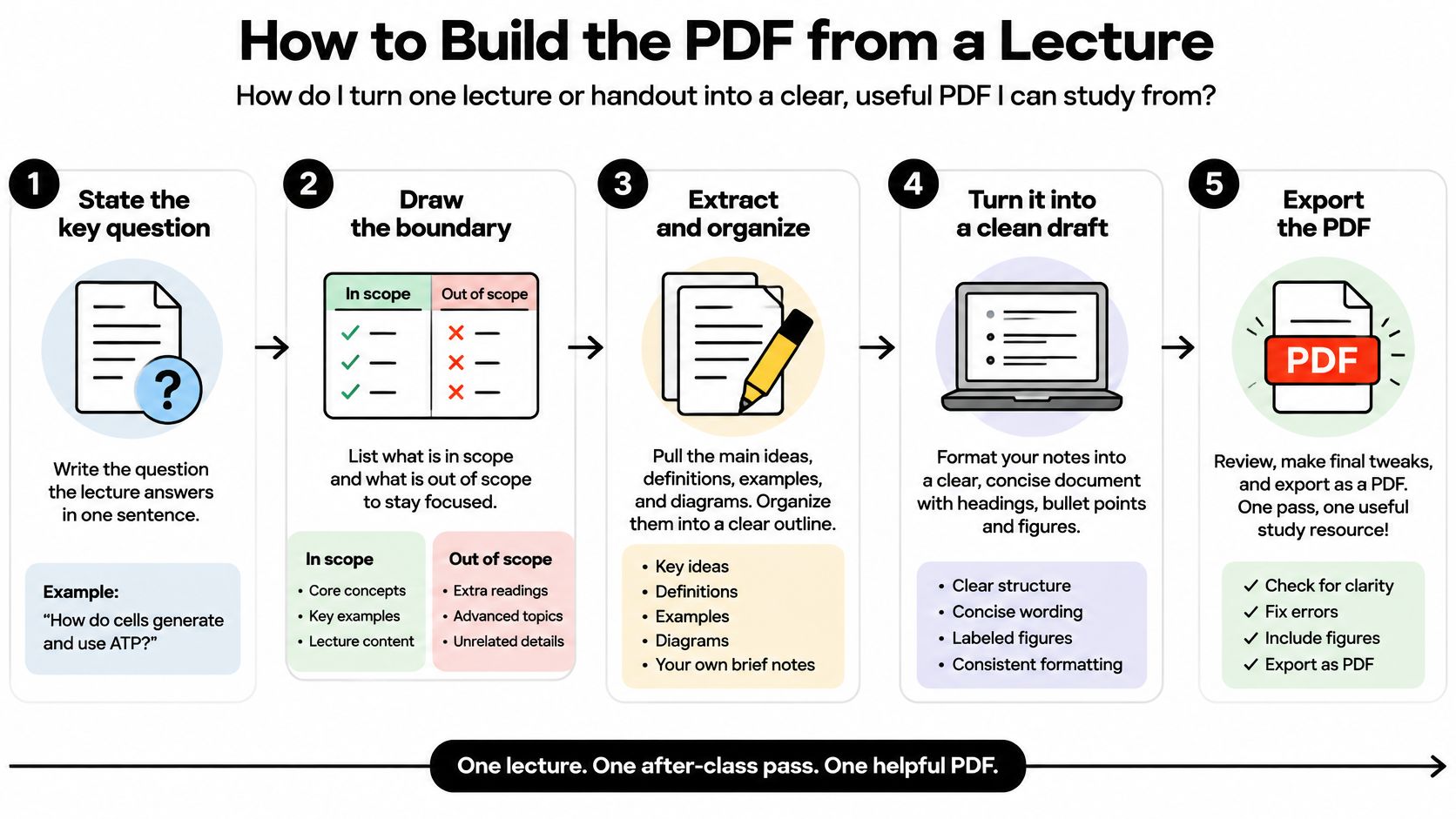
The visual is a compact reminder of the workflow; use the full sequence to build and check the document.
Establish the model
-
Write the lecture question. Put a sentence beneath the title explaining what the lecture answers. Prefer how does the booking system resolve unavailable appointments to appointment systems. The question gives you a test for including or excluding material.
-
Draw the boundary. List what's inside the lecture's explanation and what the professor treated as given. A discussion of patient assessment might assume earlier anatomy teaching without explaining it again. Keep that prerequisite visible without rebuilding the previous course.
-
Name actors and inputs. Identify who or what supplies material: a patient provides a history, a statutory text supplies requirements, or a prior chapter supplies a definition. In non-systems work, use these as source relationships rather than pretending every input is a formal data flow.
-
Decompose the main activity or argument. Create a small set of readable processes or claims. Split any box that hides unrelated jobs; group details under a parent when the page becomes difficult to scan. For a formal DFD, preserve the parent's incoming and outgoing flows when opening it into a lower-level diagram.
-
Write the mini dictionary. Define important nouns using the professor's meaning. Include abbreviations, category boundaries, and terms whose everyday meanings could mislead you. If the lecturer uses different words for the same thing, record the preferred term and its alternatives.
Preserve the route back
-
Attach source locations and retain the original. Record the page, slide, or timestamp for each flow or claim. Keep the source filename and, where your workflow supports it, its file hash so a replacement upload isn't mistaken for the original.
The Library of Congress description of ISO 32000-2:2020, PDF 2.0 explains the standardized document representation and expanded tagged-PDF capabilities, including Aside and pagination artifacts such as PageNum, LineNum, and Bates.
Preserve page identifiers, character positions, reading order, annotations, hyperlinks, embedded files, and the structure tree when available. Use structure tags as the first ordering signal and geometry as a fallback. Columns, footnotes, tables, and sidebars can appear interleaved in the content stream, so flag ambiguous regions.
-
Apply the evidence labels. Assign direct evidence, inference, uncertain, or not in source. Don't let a paraphrase gain stronger wording during editing. If the source says a result may occur, your study answer shouldn't say it always occurs.
-
Export and spot-check. Open the exported PDF, not just the editable file. Compare a central claim, a qualification, and a difficult visual or table with their source locations. Check that links work and that copied text still reads in a sensible order.
A word processor with heading styles is sufficient for many study documents; diagrams.net can help with layered diagrams. Use named headings and editable text rather than exporting every page as a flat image.
For the wider revision workflow, creating study guides means deciding how you'll practice from the material as well as how you'll arrange it. Leave room beside difficult claims for explanations you'll write from memory and then check.
Worked Example from a Memory Lecture
Say you're organizing an introductory psychology lecture about memory. This is a hypothetical teaching example, not a sourced account of a particular class. Its claims would need checking against your lecturer's material before becoming revision answers.
Put the lecture question beneath the title: how does an encountered item become something the learner can respond to later? Keep the model limited to the explanation used in that class, rather than importing every memory theory you know.
Begin with the whole activity
At the context level, place the learner outside a boundary labeled Remember the item. A stimulus enters the activity, and a later response returns to the learner. Don't split the stores yet.
Then open Remember the item into Encode, Store, and Retrieve. If the lecture uses a sensory, short-term, and long-term memory framework, place those stores in the detailed study map.
| Model part | What the study map shows | What to check |
|---|---|---|
| Encode | Input transformed into a storable representation | The lecturer's definition and examples |
| Store | Retained material in the lecture's named stores | Whether the lecturer presents a simplified model |
| Retrieve | A cue helps access retained material | Conditions and limitations on successful access |
This is a learning map, not a claim that mental activity operates like a software system. Keep the lecturer's theoretical framework attached to the diagram so you don't mistake a teaching simplification for a complete explanation.
Label an attention relationship into short-term memory if the lecture supports it. Show rehearsal as a loop associated with maintained material, and place a retrieval-cue relationship between the exam prompt and access to long-term memory.
An arrow labeled memory is unhelpful because it names the whole topic. Replace it with rehearsal if the relationship represents rehearsal. For a formal DFD, distinguish the rehearsal process from the data it carries rather than using an activity name as though it were data.
Add dictionary entries and an evidence strip
Use compact dictionary records rather than copied textbook paragraphs:
- Encoding: Transforming input into a form that can be stored. Add the lecturer's example. Attach its source location.
- Retrieval cue: A stimulus that aids recall. Identify the example used in class. Note any stated limitation.
- Forgetting: In this worked map, a failure to retrieve doesn't automatically establish that stored material vanished. Check whether the lecture also discusses other explanations. Don't turn this distinction into a universal definition.
Under Retrieve, distinguish the lecturer's claim from your interpretation. If the lecturer explicitly says recognition is easier than recall under the discussed conditions, label that statement direct evidence and add the actual timestamp.
Your explanation that multiple-choice questions may therefore feel easier is an inference. If the lecture never compares recognition and recall, that comparison is not in source, even if you remember hearing it elsewhere.
| Practice prompt | Answer in the student's words | Source location |
|---|---|---|
| Why doesn't an unsuccessful recall attempt alone prove that the item was never stored? | Access can fail, so the failed response by itself doesn't establish what happened to storage. | Enter the actual lecture timestamp before export |
This example is memory-specific. A fluids calculation procedure or safety procedure needs inputs, ordered actions, checks, and exceptions, not an automatic Encode, Store, Retrieve split.
Export the Cited Study PDF
Export only when you can use the document to answer questions and recover the supporting material. The final check isn't whether every page looks balanced. It's whether a study partner can tell what is established, what you inferred, and what still needs checking.
Complete the export checklist
-
Start with the chosen method's sections. Add the title, course, source, date, and lecture question. Remove empty template sections that don't serve the task, but retain visible gaps where the material doesn't answer a required question.
-
Prepare the selected class materials. Record or upload the lecture together with the relevant slides and handouts. Work from the searchable timestamped transcript while keeping documents available for checking terminology and visual content.
-
Complete the build sequence. Confirm the boundary, decomposition, dictionary, and source references. Preserve document structure and file identity where your tools support them; don't imply that exporting a new PDF automatically preserves the source's tags.
-
Review labels and qualifications. Keep the page, slide, or timestamp beside important claims. Make sure conditional wording survives shortening, especially in medical, nursing, construction, and occupational safety notes.
-
Check the difficult material. Include a table or diagram in your source comparison when the lecture uses one. Rebuild standards tables by columns before converting their contents into flashcards. A transcript isn't guaranteed to be accurate or complete.
-
Export the checked version. Use your editor to export the finished guide, or export the Q&A session as a PDF. Open the result and test its links, reading order, and legibility before relying on it offline.
Keep capture and study connected
ClassLecture.ai provides this capture-to-study workflow for college and graduate students: record or upload a lecture, receive a searchable timestamped transcript, and study with the selected class materials. A one-hour lecture is typically transcribed in about five minutes, after which you can begin asking questions; answers include citations to exact lecture moments or document pages.
You can also upload an exam study guide and work through its questions against the same lectures and PDFs. Keep the unanswered topics visible instead of filling them with unsupported material.
Save a checked revision version separately from your working draft. When a lecturer corrects a statement, update the linked answer and practice item together. The PDF is ready when its high-risk claims have inspected support, or a visible not-in-source label that prevents you from mistaking a gap for an answer.
ClassLecture.ai helps you turn your recordings and class documents into source-linked answers and study materials. Visit ClassLecture.ai with your next lecture and handout, then use their citations to build a structured analysis PDF you can check, question, and revise from.
The ClassLecture.ai Team
We build ClassLecture.ai, the AI study assistant that turns your recorded lectures into transcripts, summaries, flashcards, and answers cited to the exact timestamp — so you learn faster from your own professor's words.
Keep reading
What Are Structured Questions and How to Use Them
What are structured questions? Learn the definition, three layers, templates, lecture examples, and study tips.
Read8 Rhetorical Choices AP Lang Students Should Know
Master rhetorical choices ap lang with 8 analyzed examples, annotations, and exam tips for identifying devices and explaining their impact in essays.
ReadAP Art History Notes: 10 Resources for Better Study
Find AP Art History notes, flashcards, timelines, and study guides for the AP 250, plus ways to turn lectures and readings into better revision materials.
Read