How to Begin a Meeting: Checklist, Script and Icebreakers
How to begin a meeting well: a step-by-step opening script, agenda and roles, plus how to record and review the first minutes.
You have twelve minutes until a meeting that actually matters. The invite went out with a subject line and a link, and not much else. Two people will join late, someone will open with a joke, and by minute eight the group will still be aligning on why they are here.
Knowing how to begin a meeting is less about charm and more about the first design choices. A warm welcome and a shared agenda do less than the chair's clarity. What you say in the first two minutes decides whether the hour produces a decision or another round of talk.
I would treat those two minutes as a design problem. Settle the purpose, who can decide, and what done looks like before anyone introduces themselves. If you record the call, you can check later whether that opening matches the discussion that followed.
Table of Contents
- Set the Agenda, Roles and Decision Owner First
- The Five-Minute Opening Script
- Icebreakers That Fit the Meeting Type
- Fixing a Meeting That Starts Badly
- Record the Opening and Review It Next Time
Set the Agenda, Roles and Decision Owner First
Most advice on how to begin a meeting stops at welcoming people, stating the agenda, and starting. That treats the opening as a greeting. It is a decision-design problem. People need to know what they must decide, produce, or understand, which topics need pre-reading, and what authority the group has.
The Zoom meeting statistics roundup reports that 62% of surveyed workers frequently attend meetings where the goal was not mentioned in the invitation, while 54% often leave unclear about next steps or task ownership. Those gaps are already in the invite. A stronger opening states the desired output in observable terms, separates information-sharing from decision-making, names the decision owner, and says what is out of scope.
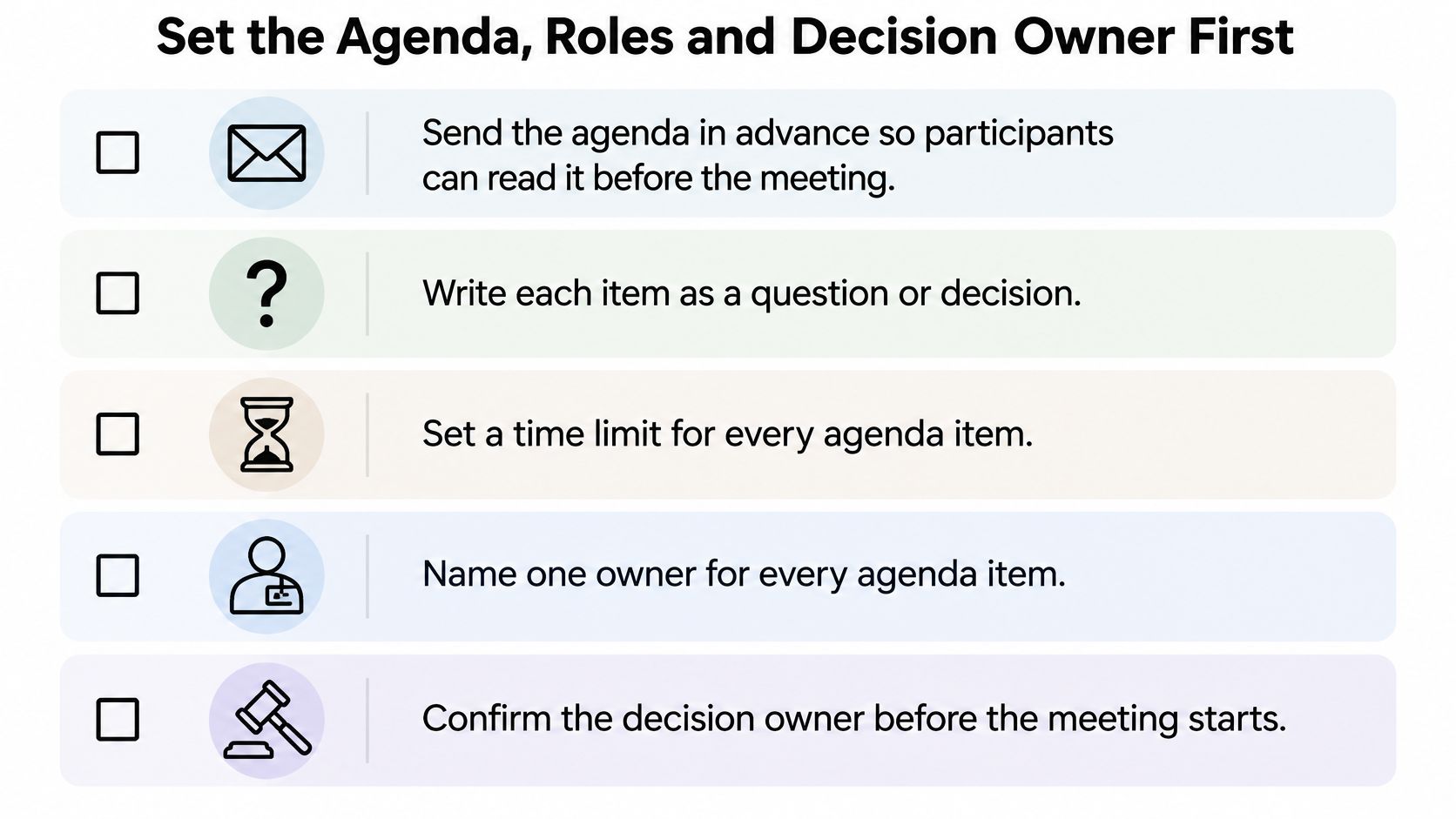
Send the agenda early enough that people can read it before they join. Write every item as a question or a decision, give it a time limit, and put one name beside it.
Roles before the invite goes out
Four roles cover almost any size of meeting.
- Facilitator: Keeps the sequence moving and cuts off loops. On a 30-minute call, this person can also watch the clock.
- Note-taker: Records decisions, owners, and deadlines, not a transcript of every sentence. The companion guide on taking meeting notes shows what belongs in that log.
- Timekeeper: Says the limit out loud when an item is halfway done. Skip a separate person when the facilitator can do it.
- Decision owner: One person per item who can say yes, no, or "we need more information." The group advises. The owner decides.
Run this checklist before you send the invite.
- State the output so a stranger could see whether it happened. "Choose the March pilot date" beats "discuss the pilot."
- Mark which items are updates and which items are decisions.
- Name the decision owner on every decision item.
- List what is out of scope, including the topic you already know someone will raise.
- Say whether pre-reading is required, and attach it to the invite.
A friendly round of introductions feels polite, and it is often the wrong use of the first two minutes. I would spend that time on decision rights and success criteria. If several people all believe they can veto the outcome, name one owner or split the meeting. Shared authority with no owner is how a tidy agenda still ends with no decision.
The Five-Minute Opening Script
The meeting is due to start, but two people are missing and the first agenda item is already drawing side comments. If you wait, the group learns that the scheduled time is flexible. If you launch into discussion without settling what the meeting must decide, the conversation can fill the hour without producing an answer. Use the first two minutes to set the purpose, confirm who has decision authority, and define what a successful outcome looks like.
A meeting-practice resource citing U.S. workplace research reports more than 55 million workplace meetings each day in the United States, at an estimated annual cost of $1.4 trillion. It also reports that non-managers attend about eight meetings per week, managers about 12, and meetings start late approximately 50% of the time. Larger decision-making groups can slow decisions, so state who owns the call rather than leaving authority implied.
Robert's Rules of Order begins its standard order of business with a call to order, followed by minutes, reports, unfinished business, and new business. A product standup does not need that formality. The useful sequence is straightforward: start on time, state the purpose, identify the decision owner and expected result, then move to the first priority.
Five steps in order
-
Start at the scheduled time. Say, “We are starting now so we can finish at 10:30.” Do not hold the opening for two empty chairs. Restarting the whole introduction for each latecomer wastes time; a sentence in chat can bring them up to speed.
-
Read the objective in one sentence. “Today we decide whether the pilot runs in March” gives the group a decision to work toward. “Quick sync on the pilot” invites tangents. On a remote call, paste the objective in chat before speaking so everyone has the same reference.
-
Name the decision owner and the output. Say who can make the call, then state what needs to exist by the end: “I own the pilot decision. We need one owner and one deadline for each task.” The group can advise, but unclear authority leaves people debating who has the final say. If there is no decision or deliverable to name, reconsider whether the meeting should be a conversation at all.
-
Confirm the agenda and time limit. “We have three items and twenty minutes each. The budget item is out of scope today.” Ask for one objection, then move on. Without a clear limit, the first item can absorb the hour. The point is to make the boundary visible, not to invite a fresh agenda-setting discussion.
-
Hand the floor to item one by name. “Priya, your timeline update is first.” This gives the group a clear next action and makes the transition from opening to work explicit. Leave the floor unassigned, and side conversation can take the time meant for the agenda.
| Phase | Purpose | Sample line |
|---|---|---|
| Start on time | Signal that the schedule holds | We are starting now so we can finish at 10:30 |
| State the objective | Give one sentence of purpose | Today we are choosing the launch date for the spring campaign |
| Name the output | Say what must be decided or produced | We need one owner and one deadline for each task |
| Confirm agenda and time | Show scope and limits | We have three items and twenty minutes each, with the budget item moved to next week |
| Hand off | Move straight into item one | Priya, your timeline update is first |
Adapt the wording to the group. Keep the order.
The CIPD 2023 evidence review links goal clarity, focused communication, positive leadership behavior, and punctuality moderately to strongly with employees' ratings of meeting effectiveness. Much of the research is cross-sectional, and it does not establish one script as effective in every situation. A formal agenda is more useful when people can read it beforehand; agendas and procedures on their own have only small effects. The chair's clarity carries as much weight as the document. On remote and hybrid calls, stating the purpose, owner, and expected result also gives participants a shared reference they can return to afterward.
Icebreakers That Fit the Meeting Type
An icebreaker should serve the decision, and it should stay under two minutes for a small group. Three minutes is the ceiling for a workshop. Longer than that, you have started a second meeting inside the first.
| Meeting type | Group size | Suitable opener | Time |
|---|---|---|---|
| Status call | 5 | One-word check-in on current mood or workload | 1 minute |
| Project kickoff | 15 | Each person names one risk they see | 2 minutes |
| Cross-team workshop | 10-20 | Silent written question on a shared document | 3 minutes |
| Client or external meeting | 4-8 | Confirm names, roles and the one decision needed | 1 minute |
| Short decision meeting | Any size | None; go straight to the objective | 0 minutes |
Match the opener to the job. A five-person status call only needs a one-word read on workload. A kickoff benefits from each person naming one risk, because that risk list is useful later. A cross-team workshop does better with a silent question on a shared document than with a performance around the table. With a client, confirm names, roles, and the single decision. Don't ask them how their weekend was.
Who a spoken round leaves out
Spontaneous verbal introductions are not automatically fair. They disadvantage people working in a second language, people on unstable connections, and people who need a moment to prepare. The Institute of Education Sciences facilitator guidance recommends connecting the meeting purpose to participants' broader work and reviewing the agenda. Put the purpose and the decision question in writing, offer chat or a silent note, and invite remote voices early without putting one person on the spot. A short bank of check-in questions keeps that prompt inside the time box.
Practical rule: In a meeting under 15 minutes with a fixed decision, skip the icebreaker and open on the objective.
Fixing a Meeting That Starts Badly
The failure you will see most often is a late start followed by a second start. You wait for two people, recap for a third, and the objective never gets said. Stop waiting. Begin, and put a one-sentence recap in the chat for anyone who joins after you.
| Symptom | Likely cause | Fix |
|---|---|---|
| Late start and repeated recaps | Waiting for latecomers | Start on time; give latecomers a one-sentence recap in the chat |
| Tangents in the first ten minutes | No stated objective | Show the objective on screen; ask if the tangent serves it |
| One person dominates | No turn-taking | Ask each person for a one-line update in a set order |
| Remote people stay silent | No written or chat input | Post a written question and read responses aloud |
| Group leaves without owners | No outputs named | Restate each decision and owner in the last minute |
When you inherited the meeting
Sometimes the invite isn't yours. A manager forwarded it, the agenda is one vague bullet, and people are already talking. Take two minutes before you continue. Say it plainly: "I didn't plan this, so I want to confirm the objective before we go on." Ask the group for one sentence of purpose and one owner. If they can't agree, that disagreement is the meeting. The rest of the agenda can wait.
Recovery after minute ten
A tangent feels useful because it is specific. Put the objective on the screen or in the chat and ask whether this thread serves it. If it doesn't, park it with a name and a date. One person talking over everyone else is usually a missing turn, not a character flaw. Go around the group for a one-line update in a fixed order, and include people on the call, not only people in the room.
Silence from remote colleagues is a missing channel. Post one written question and read two or three replies aloud before you open the floor. In the last minute, restate each decision and its owner even if you think everyone heard it. That sentence is what people act on after they leave.
If the opening failed, you can still rescue the close. Name the decision and the owner before anyone drops off the call.
Record the Opening and Review It Next Time
Memory keeps the argument and drops the sentence that started it. The first five minutes are where the tone and the scope get set, so they are the minutes worth hearing again. Record that window, then review it before you run the same meeting a second time.

Get consent from every participant, and say so in the invite rather than as a surprise when people join. For an online call, capture tab or system audio from Zoom, Google Meet, or Microsoft Teams. In a room, a phone or laptop mic near the middle of the table is enough. You are listening for whether the objective was stated, not for studio sound.
A short demonstration of a tight opening helps if you want to hear the pace before you try it.
What to tag in the first five minutes
Transcribe the audio and mark the opening against the sequence you meant to run.
- Start: Did the meeting begin at the scheduled time, or did you wait?
- Objective: Was the purpose one sentence someone could repeat?
- Outputs: Were the decisions, owners, or deliverables named out loud?
- Agenda: Was the list confirmed, including the time limit and anything moved out?
- First voice: Who spoke after you, and did a remote or junior person get a real turn?
ClassLecture.ai is one way to do that review. Record Meeting captures tab or system audio from Chrome or Edge, and the transcript with timestamped questions lets you compare the purpose you stated with the discussion that followed. The steps in how to record a meeting cover consent, audio sharing, and a short test before people arrive. You can do the same check with any recorder and a notes doc if you prefer.
Change one thing
Record the opening of your next meeting. Play the first three minutes against the five-phase sequence. Change one element before the following meeting: the start, the objective sentence, the named owner, the time limit, or who speaks first. One change survives a busy week. A full rewrite of your style usually doesn't.
ClassLecture.ai records a live Zoom, Google Meet, or Microsoft Teams session in Chrome or Edge, then turns that audio into a transcript you can question with timestamps. Use it on your next opening to check whether the purpose, the owner, and the decision you stated really came up in the discussion. Start with the meeting you already have on the calendar at ClassLecture.ai.
The ClassLecture.ai Team
We build ClassLecture.ai, the AI study assistant that turns your recorded lectures into transcripts, summaries, flashcards, and answers cited to the exact timestamp — so you learn faster from your own professor's words.
Keep reading
10 Check in Questions for Classes and Meetings
Discover 10 check in questions for classes and meetings, grouped by well-being, comprehension, and progress, with example phrasing and async tips.
ReadHow to Record a Meeting for Better Study Notes
Learn how to record a meeting with clear audio, handle consent, and turn live sessions into interactive study guides and flashcards using ClassLecture.ai.
ReadHow to Record Meeting and Transcribe Without an Account
Learn how to record meeting and transcribe sessions in your browser. Step-by-step guide covering audio quality, privacy, and turning transcripts into searchable
Read