Taking Meeting Notes: A Practical Guide for 2026
Master taking meeting notes with proven methods, real-world workflows, and AI tools that turn discussions into actionable results without losing time.
You finish a strategy meeting feeling confident. The priorities sound clear, everyone appears aligned, and you promise to send the notes before moving to the next call. Two days later, the document is buried under newer messages. A colleague asks why a decision changed, an owner says they never agreed to the task, and the only person who remembers the reasoning is already in another meeting.
Taking meeting notes isn't about recording every sentence. It's about preserving the decisions, context, and commitments that need to survive after the conversation ends. A durable record connects what people discussed with what they must do next.
Table of Contents
- Why Your Meeting Notes Keep Disappearing
- Choosing a Note-Taking Method That Fits Your Workflow
- Writing Faster With Timestamps and Abbreviations
- Merging Notes With Recordings for Better Retention
- How ClassLecture.ai Simplifies the Review Workflow
- Building a Sustainable Post-Meeting Routine
Why Your Meeting Notes Keep Disappearing
Most note-taking fails before anyone writes the first line. The writer treats the meeting as a stream of comments instead of a sequence of decisions, questions, and commitments. The result is usually a long list of observations with no clear owner, deadline, or explanation of what changed.
That failure matters because modern meetings consume a substantial part of the working week. A 2026 meeting benchmark report estimates that the average knowledge worker attends 21.7 meetings per week, spends 11.3 hours in them, and carries an annual meeting load equivalent to 9.8 full workweeks. The same report estimates that 70% of meeting decisions are forgotten within 24 hours when follow-up notes aren't shared.

The problem isn't a lack of attention. Even an attentive participant can miss the difference between an idea, a tentative preference, and an approved decision. Notes need visible labels that make those distinctions obvious to someone who wasn't in the room.
Write for the next person
A useful record answers four questions quickly:
- What was decided? State the outcome, not just the discussion.
- Who owns the next step? Assign one accountable person wherever possible.
- When is it due? Record a date or clearly mark the timing as unresolved.
- Why did the team choose it? Preserve enough reasoning to prevent the same debate from returning.
Meeting notes have served this purpose for centuries. Records from ancient civic institutions used stone, wax, and papyrus to preserve debate outcomes, while the term “minutes” is associated with minuta scriptura, meaning abbreviated or small writing. The history of meeting minutes shows that written records have long supported continuity and accountability across governments, law, and organizations.
Practical rule: If a note doesn't help someone understand a decision or take the next action, question whether it belongs in the final record.
A recording or transcript can preserve the full conversation, but neither automatically creates an actionable record. The durable system combines selective human capture with a searchable source that lets you verify what was said.
Choosing a Note-Taking Method That Fits Your Workflow
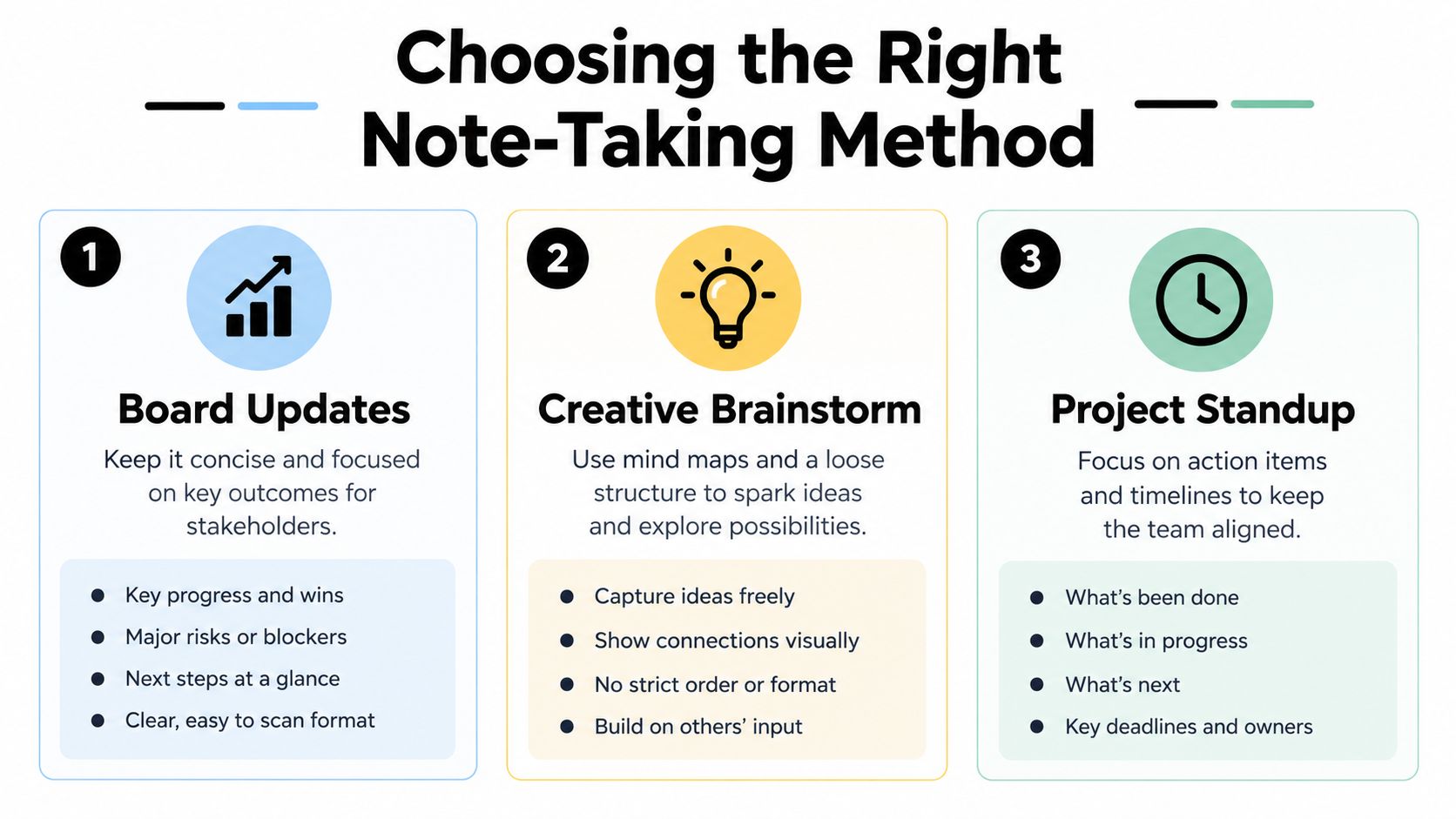
Not every meeting deserves the same layout. A board update usually follows a fixed sequence, a brainstorm depends on relationships between ideas, and a project standup needs fast visibility into blockers and ownership.
Three useful formats
The outline method mirrors the agenda. Put each topic at the top level, then indent supporting points, decisions, and actions underneath it. It's fast, familiar, and easy to scan after a reporting meeting or structured project review.
The Cornell method divides the page into notes, cues, and a summary. During the meeting, capture details in the notes area. Afterward, turn important concepts into cue words and write a short summary. This extra processing takes more effort, but it makes review clearer when you need to remember reasoning rather than distribute tasks.
Mind-mapping works best when the conversation moves in several directions. Place the central question in the middle, then branch into ideas, objections, dependencies, and possible outcomes. It's less suitable for formal reporting because chronology and ownership can become difficult to follow.
Note-Taking Methods Compared
| Method | Best For | Review Clarity |
|---|---|---|
| Outline | Agenda-led updates and reporting | High for chronological review |
| Cornell | Learning-focused or reasoning-heavy meetings | High after cue and summary review |
| Mind map | Brainstorms and non-linear discussions | High for relationships, lower for formal action tracking |
The choice should follow the meeting's output. If stakeholders need a clean account of what happened, use an outline. If participants need to absorb and revisit complex reasoning, use Cornell. If the room is generating possibilities, start with a mind map and convert confirmed decisions into a structured action list afterward.
Don't switch formats just because a new template looks attractive. Pick one primary method for recurring meetings, then add a small decision and action area to it. Consistency helps teammates know where to look, even when the meeting itself changes.
Choose the format by the review question: “What happened?” calls for an outline. “What should I remember?” suits Cornell. “How do these ideas connect?” points to a mind map.
Writing Faster With Timestamps and Abbreviations
Meetings move too quickly for verbatim writing. The practical alternative is a shorthand system that compresses repeated phrases while preserving meaning.
Start with a small, stable vocabulary. Use DEC for a decision, ACT for an action, Q for an open question, RISK for a concern, and TBD for an unresolved point. Add symbols only when they have one consistent meaning. Creativity slows you down when a teammate has to decode what your marks mean later.
Build a repeatable shorthand
Shorten terms that appear often in your work:
MKTfor marketingbgtfor budgetreqfor requestw/for withETAfor expected timingdepfor dependency
Use dates in a consistent YY-MM-DD format. A note such as ACT, Product, confirm launch assets, 26-06-18 is easier to sort and search than a vague phrase like “follow up next month.” Don't abbreviate names, commitments, or technical terms if doing so could create ambiguity.
A raw capture might read:
[00:42:10] Q3 MKT bgt approval required, finance concern, revisit
After the decision, revise it to:
[00:42:10] DEC, Q3 MKT bgt APPROVED, Finance to confirm allocation
The timestamp links the conclusion to its source. If the wording is disputed, you can return to the relevant moment instead of searching an entire recording.
Mark the meeting as it moves
Add a timestamp before each major topic, decision, or important objection. Use cue words at the beginning of lines so your eyes can find the material later:
[00:18:34] WHY, change onboarding sequence
[00:27:51] RISK, engineering capacity
[00:35:09] ACT, Maya, validate customer feedback
[00:49:20] TBD, final rollout date
This system works particularly well when paired with a searchable transcript. A guide to making transcripts can help clarify the difference between raw speech capture and a reviewable text record, but the transcript shouldn't replace your judgment about what matters.
The rule is simple: capture less, label better, and timestamp anything you may need to verify. A short note with a clear marker is more useful than a detailed paragraph that hides the decision.
Merging Notes With Recordings for Better Retention
Typed notes are fast to scan, but they compress the conversation. Recordings preserve tone, qualifications, and context, but they're cumbersome when you don't know where to look. Used together, they create a better record than either source can provide alone.
During the meeting, write only the signals that require judgment. Mark decisions, unresolved concerns, commitments, and moments where someone's wording seems important. If the meeting is recorded with consent, let the recording preserve the surrounding explanation.
Use each source for a different job
Your notes should answer, “What should I pay attention to?” The transcript should answer, “What exactly was said?” The recording should answer, “How did the exchange unfold?”
A practical post-meeting workflow looks like this:
- Capture selective notes using your chosen layout and shorthand.
- Keep the recording as context rather than trying to replay it from the beginning.
- Attach the notes to the recording in one workspace.
- Search the transcript for a decision, name, phrase, or timestamp.
- Verify sensitive details before sharing the final summary.
- Publish the cleaned record with decisions, owners, deadlines, and open questions.
This combination also supports retention. A meeting recording to notes workflow shows how recorded content can become a searchable reference instead of a file that sits untouched in cloud storage.
Review against the source
AI can help organize a transcript, identify themes, and surface possible action items. It can also misread speaker attribution, treat a suggestion as a decision, or omit a qualification that changes the meaning.
That risk is why source grounding matters. Research and reviews on AI meeting-notetaker accuracy distinguish transcript quality from downstream reliability. Speaker attribution errors can still occur at around 11–13%, while action-item accuracy may be materially weaker than transcription accuracy. Summary quality is also difficult to evaluate because standard measures can miss subtle factual errors.
Use the transcript to support your notes, not to outsource accountability. The final record should make clear what came from the source and what represents your interpretation.
How ClassLecture.ai Simplifies the Review Workflow
A workable capture-to-review pipeline starts with the material you already have. You can record a live session from Chrome during Zoom, Google Meet, or Microsoft Teams, or upload an existing MP3, MP4, MOV, or WAV file. ClassLecture.ai also supports bulk uploads of up to 80 files, with the first 10 prioritized for faster transcription, according to the platform information provided for this workflow.

The point isn't to create another transcript archive. It's to connect the conversation with the notes and reference material needed to interpret it.
A practical review sequence
Start with capture. Choose Record Meeting for a live browser session, or upload the existing recording. If you've already taken handwritten or typed notes, keep them available for the next step rather than rewriting them immediately.
Add context. Attach your notes, textbook PDFs, or other supporting documents. Combining the transcript with external material helps distinguish what the meeting established from background information that participants assumed.
Scan the transcript. The transcript view turns spoken content into searchable text. Look for names, decisions, deadlines, and the shorthand markers you wrote during the meeting.
Ask source-specific questions. The conversational Q&A feature can answer questions from your materials and cite relevant timestamps or document pages. Ask focused questions such as, “What did we approve about the launch sequence?” or “Which risks remained unresolved?” Then verify the cited passage before turning the answer into a commitment.
Choose the review mode. A standard summary helps with a quick recap. A speaker-focused summary helps when responsibilities or viewpoints matter. Flashcards and spaced repetition suit learning-heavy sessions where you need to retain concepts, not just distribute actions.
These modes serve different jobs. A summary reduces the meeting to its usable shape. Q&A helps investigate a detail. Flashcards turn important information into retrieval practice. Spaced review gives the material a later place in your workflow instead of leaving it in a document nobody opens.
The platform's stated free access includes up to 3 hours of meeting recording per month and up to 10 questions per month, subject to change. Treat those limits as plan details to verify before adopting the tool for a larger team.
The video below provides a visual look at the product workflow.

The important habit is to review the output against the source. Don't share an automatically generated summary just because it arrived quickly. Check speaker names, decision language, owners, dates, and any sentence that could change a project commitment.
Building a Sustainable Post-Meeting Routine
The meeting ends when the call closes, but the note-taking process doesn't. Notes become useful only after someone turns rough capture into a record that other people can trust and act on.
Clean up the document while the conversation is still fresh. Guidance on writing a meeting summary recommends a prompt review, and practical meeting-note guidance recommends finishing cleanup within about 30 minutes and sharing the result the same day, as described by Slack's meeting-note guidance.
Use a short closing checklist
- Confirm decisions: Separate approved outcomes from proposals, preferences, and unresolved questions.
- Name owners: Give each action one accountable person, even if several people contribute.
- Record deadlines: Use the agreed date, or mark the timing as TBD rather than guessing.
- Check the source: Follow timestamps back to the recording when the wording is sensitive or disputed.
- Share the record: Send the cleaned notes through the team's normal searchable workspace.
- Track the work: Move actions into the project system or review them at the next meeting.
Privacy needs the same deliberate treatment as accuracy. A survey on AI note-taker adoption found that 50% of professionals who don't use AI note-takers identify privacy and security as the main blocker. The same source reports that 84% of users changed what they said after learning that a note-taker was listening.
Tell participants when a meeting is recorded, explain where the material will be stored, define who can access it, and state how long it will be retained. If the discussion is sensitive, decide whether a recording is appropriate before the meeting begins. Trust isn't a feature added after capture. It shapes what people are willing to say.
The complete workflow: Capture with intent. Preserve the source. Verify the output. Share the same day. Follow up on the action.
ClassLecture.ai lets you record or upload meetings, review timestamped transcripts, ask questions against your own materials, and create summaries or flashcards for later retention. Use it for your next meeting by capturing selective notes during the conversation, checking the transcript afterward, and sharing only the verified decisions and actions.
The ClassLecture.ai Team
We build ClassLecture.ai, the AI study assistant that turns your recorded lectures into transcripts, summaries, flashcards, and answers cited to the exact timestamp — so you learn faster from your own professor's words.
Keep reading
How to Write a Summary of a Meeting
Learn how to write an accurate summary of a meeting using transcripts and AI. Discover capture, editing, and automation tips with ClassLecture.ai.
ReadZoom Meeting Transcript Explained and How to Use It
Learn what a Zoom meeting transcript is, how transcription works, permissions, and how to use your Zoom meeting transcript for study and review.
ReadHow to Make Transcripts from Lectures and Meetings
Learn how to make transcripts from lectures and meetings. Covers recording, automated vs manual options, editing, timestamping, and exporting for search.
Read