Lecture Notes AI Explained How It Turns Lectures Into Study
Discover what lecture notes AI does, how it works, its benefits and limits, and how to turn recordings into transcripts, flashcards and Q&A.
You leave a difficult lecture with three unreliable things: hurried handwriting, half-finished diagrams, and a recording you probably won't replay. The professor explained a pathway, proof, or historical argument in a few minutes, but your notes captured fragments. Later, you remember the topic felt clear in class, yet you can't find the explanation when you need it.
That gap is where lecture notes AI can help. It can turn a recording or uploaded document into searchable text, then use that material to create summaries, study guides, flashcards, and questions. Used carefully, it acts less like a machine replacing your thinking and more like a study partner that helps you locate, organize, and revisit what your instructor said.
The distinction matters. A transcript can contain errors. A polished summary can omit a condition that changes the meaning of an equation. A complete set of AI-generated notes can also tempt you to stop taking any notes yourself, even though active processing remains part of learning. Privacy and consent matter too, particularly when a tool records a live class or online meeting.
This guide follows the entire pipeline, from lecture capture to recall. You'll learn what the technology does, where transcription quality can fail, how to choose between AI assistance and hands-on note-taking, and how students, teaching assistants, and instructors can use the workflow. ClassLecture.ai will serve as the applied example near the end, with verification and responsible use treated as essential parts of the process.
Table of Contents
- Introduction Why Lecture Notes Still Feel Overwhelming
- What Lecture Notes AI Actually Does
- How Lecture Notes AI Works From Audio to Answers
- Benefits and Limitations You Should Weigh Honestly
- Who Uses Lecture Notes AI and How
- Putting It Into Practice With ClassLecture.ai
- Using Lecture Notes AI Responsibly and Effectively
Introduction Why Lecture Notes Still Feel Overwhelming
Maya enters a biology lecture filled with diagrams. Her professor moves quickly from cellular structures to experimental evidence and exam hints, so she writes almost constantly. By the end, arrows point toward words she can barely read, and the recording is sitting in a poorly labeled downloads folder.
That evening, she opens the file and tries to review. She hears an explanation, pauses to write, rewinds, and then loses the next part of the discussion. After several minutes, she closes the recording and promises to study before the exam. The obstacle is practical: she has no quick way to find one definition, connect a spoken explanation to a slide, or return to the moment when the professor introduced an exception.
Lecture notes AI changes that starting point. A recording becomes a searchable study source rather than a file that must be replayed from beginning to end. With a suitable workflow, students can turn the file into material you can search and question, find a term, request a summary of one concept, create flashcards from a selected passage, and check the original audio when an answer seems uncertain.
The tool should assist active study, not replace it. A student might take brief notes during class, then use AI to organize missed details or locate a confusing explanation. Reviewing the timestamp and comparing the generated text with the recording helps catch misheard terms, omitted conditions, and summaries that sound confident but lack the instructor's full meaning.
Practical rule: Use AI to reduce review friction while keeping the thinking, recall, and verification that make review useful.
This workflow can help students with recorded lectures, dense courses, several classes, or a second language to process. Learners who benefit from hearing an explanation more than once can also use the transcript and timestamps for deliberate replay. The growing market reflects wider interest in this kind of capture and review. The global lecture transcription platforms market was valued at USD 1.02 billion in 2024 and is projected to reach USD 3.19 billion by 2033, at a 16.3% compound annual growth rate, according to lecture transcription market data from Sonix. The same source estimates the broader lecture capture systems market at USD 4.1 billion in 2024, projected to reach USD 9.4 billion by 2030 at a 12.6% CAGR, with higher education representing more than 55% of global lecture capture adoption.
Consent and privacy belong at the beginning of the workflow, especially for live classes or online meetings. The useful question is whether AI helps you understand, retrieve, and verify course content. ClassLecture.ai will provide the applied example later, while the rest of the guide examines the process from capture to study.
What Lecture Notes AI Actually Does
Start with a simple analogy. A lecture recording is like raw video footage. It contains everything, but it's difficult to use quickly. A lecture notes AI system acts like an editing desk. It separates the spoken material into text, organizes the important parts, and gives you several ways to work with the same source.
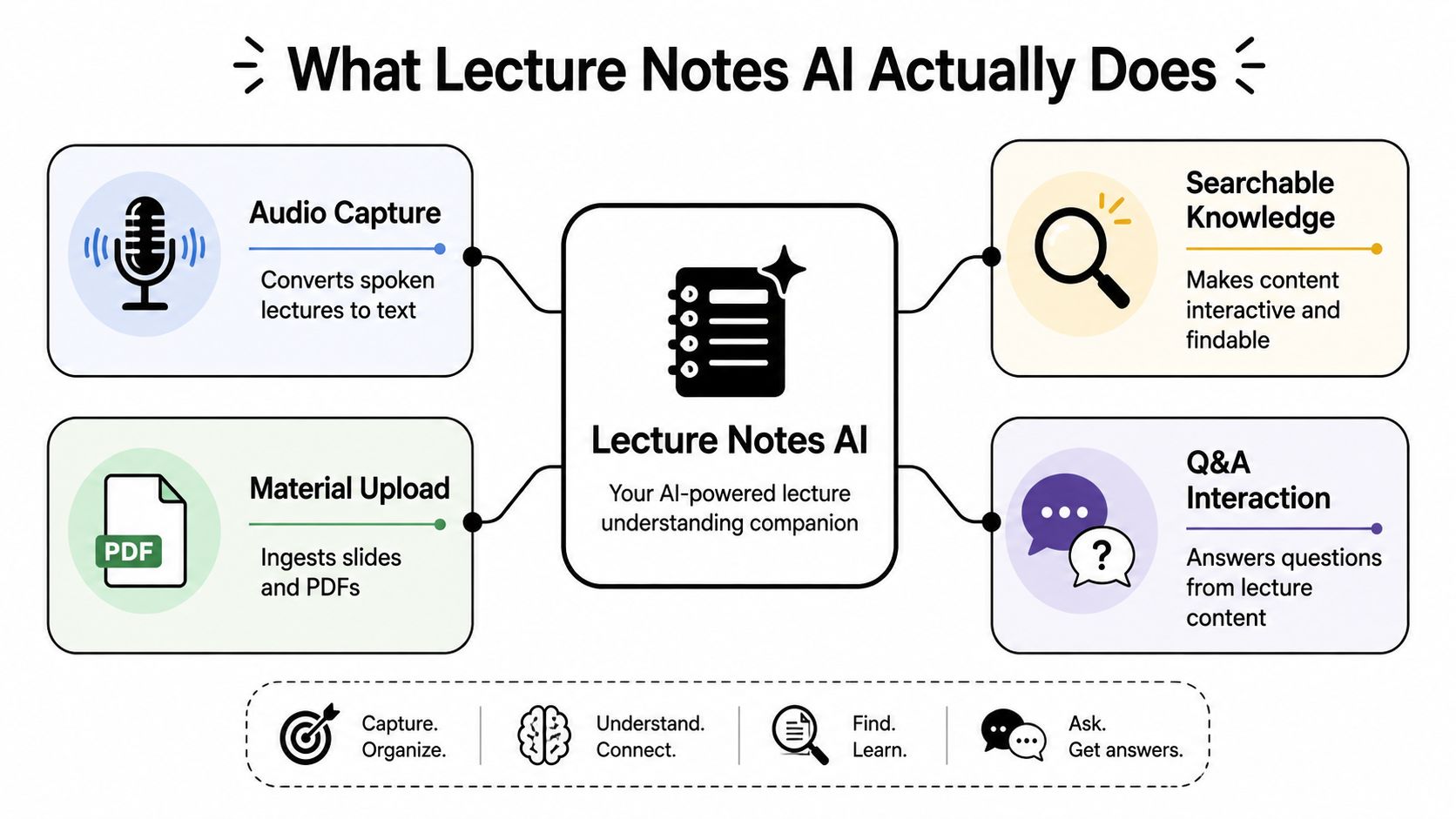
From raw lecture to study material
The first layer is capture or upload. You provide an audio or video recording, or add supporting material such as slides, a textbook chapter, or your own notes. The system then creates a transcript, which gives you a written version of the spoken lecture and a way to search for terms without listening to the entire file.
The next layer is organization. AI can identify themes, definitions, examples, and apparent transitions. It may turn a long lecture into a summary or structured study guide. It can also convert ideas into flashcards, such as a question on one side and an answer on the other, or a fill-in-the-blank prompt that requires you to supply a missing term.
The final layer is interaction. Instead of asking a general chatbot, “What is operant conditioning?”, you can ask a question about the lecture's explanation of operant conditioning. The answer should be grounded in the materials you've provided, not in an unrelated general answer. A tool such as an AI-powered study assistant for lecture content becomes more useful when it can show the passage, page, or timestamp behind its response.
What it isn't
Lecture notes AI isn't a guarantee that every word was heard correctly. It isn't a substitute for the professor's slides, assigned readings, or your own judgment. It also isn't identical to a generic chatbot that produces an answer from broad training. The difference is source grounding. A grounded system works over a selected collection of materials, so you can ask, “Where did this lecture define the term?” rather than accepting an answer with no connection to your course.
That connection supports a better study habit. You read the generated explanation, test yourself with a question, and then inspect the original transcript when the answer seems too broad or too certain. The AI organizes the footage, but you remain the editor who decides what belongs in your understanding.
How Lecture Notes AI Works From Audio to Answers
The visible result may be a neat summary, but several operations sit behind it. Understanding those operations helps you judge what the tool can do and where you need to check its work.
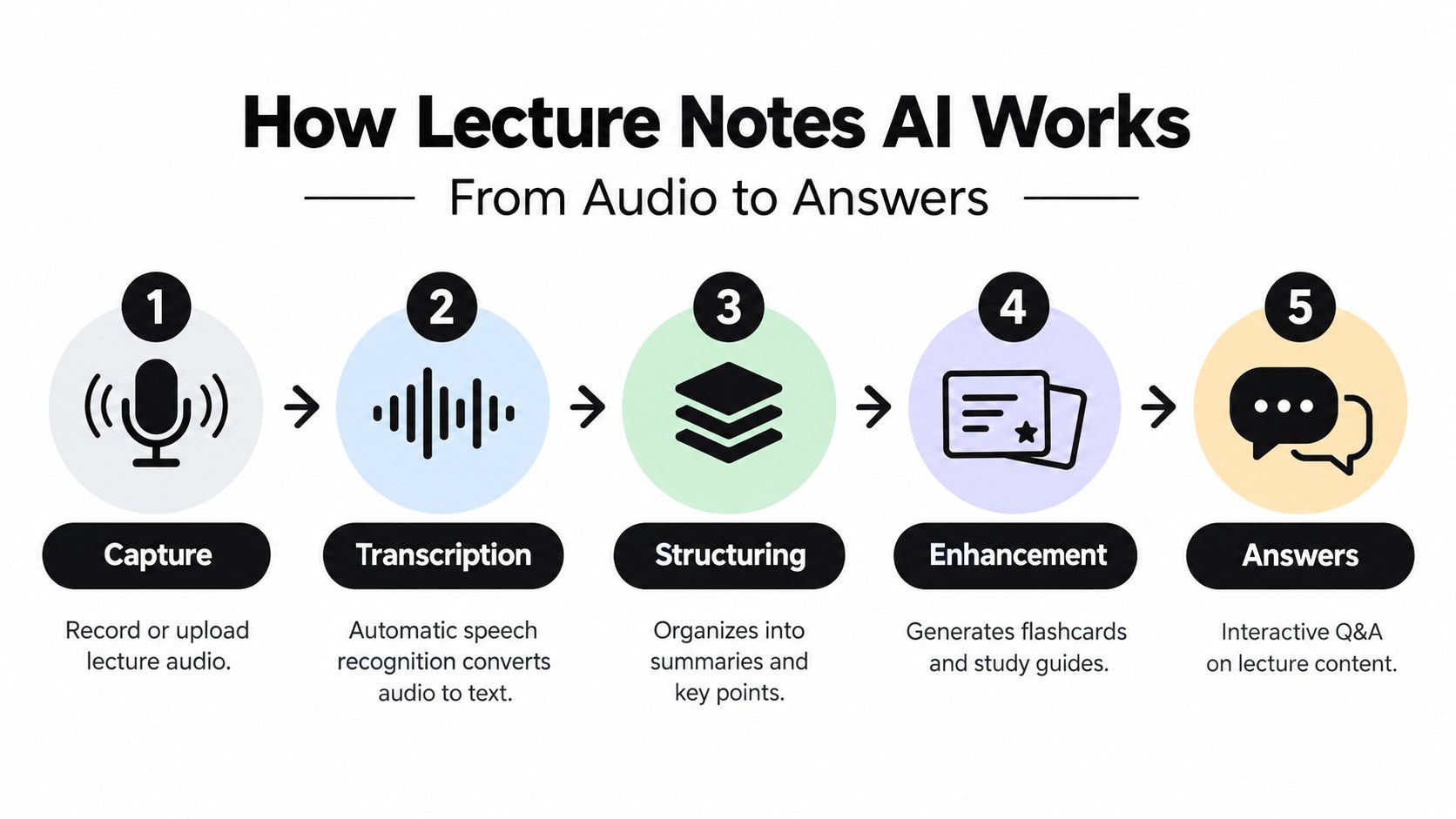
1. Capture and prepare the source
The process starts with an audio or video file, a live recording, or uploaded documents. The system needs enough usable signal to distinguish the speaker's voice from room noise, overlapping conversation, keyboard sounds, and poor microphone placement. A clear recording gives the later stages better raw material, while a muffled file creates uncertainty that no summary interface can fully remove.
You can also add slides, PDFs, or personal notes. These materials provide written context for terms that may be difficult to recognize by sound. A slide can clarify whether the professor said one technical word or another, but it doesn't automatically prove that the generated transcript is correct.
2. Automatic speech recognition creates text
Automatic speech recognition, often called ASR, maps sounds to words. It uses patterns in speech, language, and sometimes the surrounding context to estimate what the speaker said. Accents, rapid delivery, specialist vocabulary, interruptions, and poor segmentation can all increase the chance of an incorrect word.
Quality varies substantially across vendors and individual recordings. A benchmark of 11 common ASR services found wide variation across lecture samples, while an earlier academic lecture transcription study reported word error rates from 31.8% to 61.1% and word correctness from 58.4% to 81.4%, as documented in the lecture transcription benchmark. Those figures aren't a reason to reject transcription. They are a reason to treat a transcript as a searchable draft that needs checking, especially in mathematics, medicine, law, and other vocabulary-heavy subjects.
3. The system structures the transcript
Once text exists, a language model can group related ideas, identify repeated themes, and produce summaries or key points. It may recognize that several paragraphs belong to one concept even when the professor moved between an example and a definition. It can also create study aids from the transcript and accompanying documents.
This stage is useful because a transcript preserves detail but doesn't automatically reveal importance. A summary gives you a map. It can also create a false sense of completeness, so compare the summary with the original lecture objectives and required readings.
4. Retrieval supplies answers from selected sources
When you ask a question, the system searches the relevant material, selects passages, and generates an answer from them. The source scope matters. If you ask about an audio transcript only, the answer may differ from one based on the transcript plus textbook and notes. Narrow scope can prevent unrelated information from entering the response.
5. Timestamps provide the verification layer
A useful answer should point you back to evidence. Timestamp alignment lets you jump to the moment where a claim appeared. Page references can perform the same function for documents. If an answer affects an exam definition, a lab procedure, or a derivation, open the cited location and compare the generated wording with the original.
For a visual explanation of this pipeline, you can also review the embedded overview below.

The practical workflow is therefore not “record and trust.” It is capture, transcribe, structure, question, and verify. A guide to transcribing a lecture can help you prepare the source before you begin studying from it.
Benefits and Limitations You Should Weigh Honestly
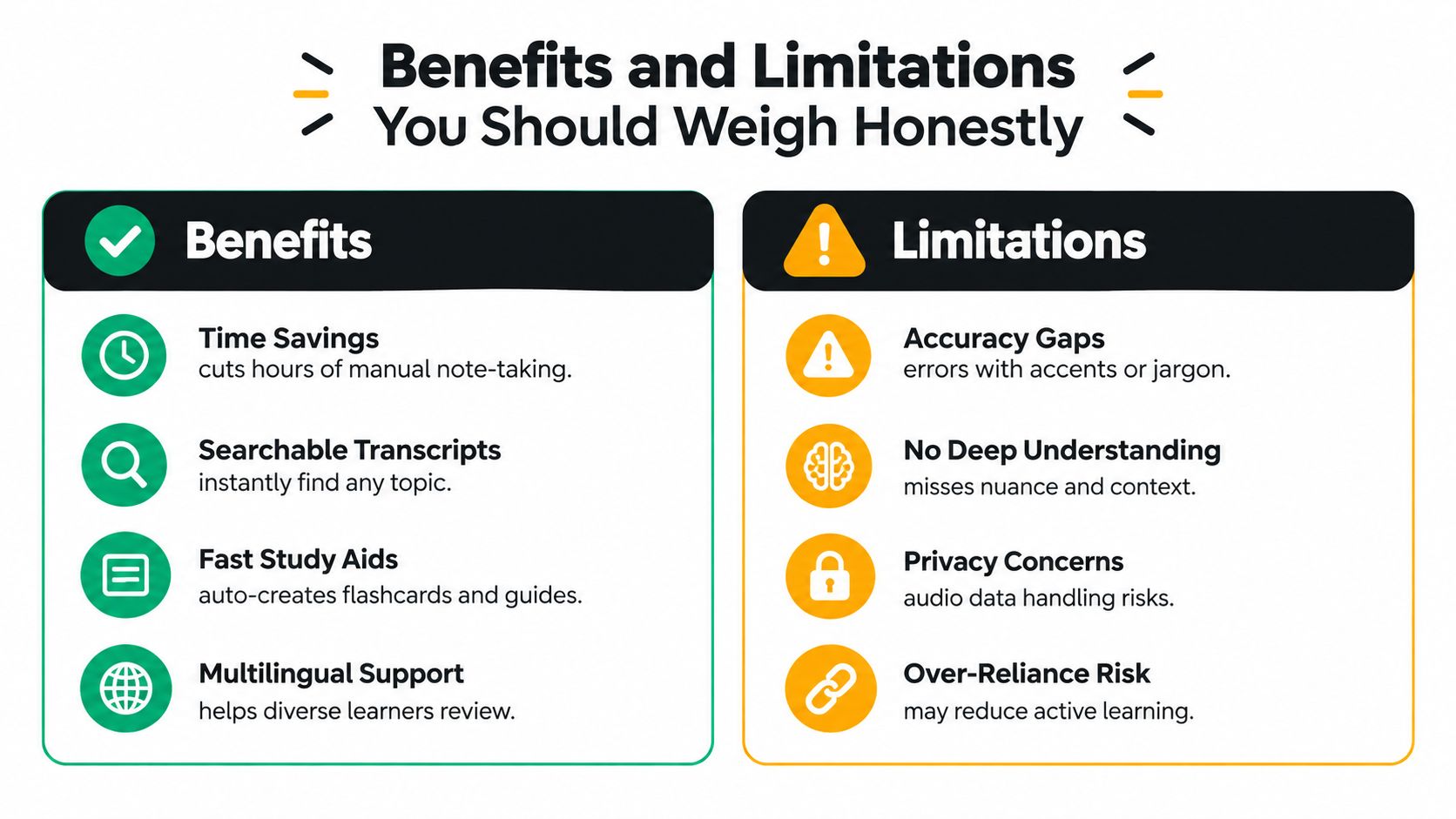
Lecture notes AI solves a genuine time problem. Students can search a transcript instead of manually scanning pages, generate a first version of a study guide instead of formatting one from scratch, and ask focused questions about difficult passages. Learners reviewing in a second language may also benefit from seeing spoken explanations in written form, then returning to the audio when tone or emphasis matters.
The strongest advantage is not the summary itself. It's the reduction of search cost. A timestamped transcript can help you find the moment when a professor introduced a qualification, corrected an earlier statement, or worked through an example. That makes repeated review more practical.
Benefits and limits side by side
| Situation | Best Approach | Why |
|---|---|---|
| You need to locate a definition in a long recording | Let AI transcribe and search | Search reduces replay time, while the timestamp lets you inspect the original explanation |
| The lecture contains unfamiliar technical vocabulary | Combine AI notes with your own annotations | ASR can confuse jargon, symbols, and similar-sounding terms |
| You are reviewing a broad introductory lecture | Use AI for a first study guide, then quiz yourself | A guide provides structure, but retrieval practice tests whether you understand |
| You are learning a proof, calculation, or clinical process | Stay hands on while using AI as a reference | Writing steps and making decisions preserves productive effort |
| You are preparing for a high-stakes exam | Use AI to find and organize, not to replace course materials | Instructor wording, exceptions, and required methods may matter |
| You want to record a live class or meeting | Obtain permission and check institutional policy first | Consent, privacy, and data handling come before convenience |
The learning risk
A complete AI note set can save time while weakening attention if you stop processing the lecture yourself. Independent higher education analysis describes studies in which fully offloading note-taking was associated with score drops of 35% in one study and 24% in another, while other research found AI-assisted note-taking could improve listening comprehension and academic achievement for English for Academic Purposes students, as discussed in analysis of AI's impact on higher-education note-taking.
That tension suggests a useful division of labor. Let AI handle capture, organization, and retrieval. Keep human effort for prediction, annotation, solving, explaining, and deciding which details matter.
Privacy is part of the decision
Recording a classroom captures other people's voices and sometimes sensitive discussion. Universities have reportedly blocked third-party AI note-taking bots from Zoom and Microsoft Teams meetings, and privacy remains a common reason students avoid AI use, according to coverage of AI note-taking tools for students. Ask before recording, check your institution's rules, and understand where the file is processed and stored.
Who Uses Lecture Notes AI and How
A student taking several lecture-heavy courses may use the system differently from an instructor preparing materials. The technology is the same, but the job changes.
The undergraduate workflow
Jordan leaves an economics lecture with a rough page of notes and an upcoming problem set. He uses the transcript to find the explanation of elasticity, then asks for a comparison between the lecture's example and the assigned reading. Rather than copying the answer, he turns the response into a question and writes his own explanation before checking the timestamp.
Later, he reviews flashcards from several classes. The goal isn't to admire a clean summary. It's to retrieve a definition, distinguish related ideas, and notice which cards still feel uncertain. Spaced repetition is particularly relevant here. In a large randomized medical-education study, spaced repetition produced better learning at 18 months, with scores of 58.03% versus 43.20% compared with no spaced repetition, and improved knowledge transfer at 58.33% versus 52.39%, as reported in the Academic Medicine study. A broader review in that source also found spaced practice consistently outperformed massed cramming when total study time was held equal.

The teaching assistant's workflow
A teaching assistant may upload a lecture outline, class recording, and discussion notes to identify recurring questions. The assistant can then draft a review sheet or locate the portion of a lecture that explains a difficult assignment concept. Human review remains necessary because a generated guide can misstate the instructor's intended method or omit an important boundary.
The online and international learner's workflow
An online learner may rely heavily on recorded instruction and need to move between listening, reading, and questioning. A transcript offers a second route into the material, while timestamped answers make it easier to return to the speaker's emphasis. A multilingual student can first read a generated explanation, then listen again to the original phrase and add course-specific vocabulary to personal notes.
In each case, the system supports a different bottleneck. One student needs retrieval, another needs preparation, and another needs access through multiple formats. None of them should treat generated material as the final authority. The lecture, syllabus, textbook, and instructor's guidance still determine what the course requires.
Putting It Into Practice With ClassLecture.ai
Use one lecture as a complete test rather than activating every feature at once. ClassLecture.ai can serve as an example of a capture-to-study workflow because it brings recording or upload, transcription, study materials, and source-based questions into the same environment.
Start with the source
Upload an existing lecture or record one in the browser. The platform supports audio and video formats including MP3, MP4, M4A, WAV, MOV, and WEBM, along with document formats such as PDF and DOCX. It also supports bulk upload of up to 80 audio or video files, with the first ten prioritized for faster transcription. If your semester archive is large, begin with the lecture most relevant to the next assessment instead of importing everything immediately.
You can organize material under Classes, using course details such as code, school, term, and year. Add slides, notes, or textbook sections when they clarify the recording, but keep the source collection tidy enough that you know which materials informed an answer.
Read before you generate
Open the transcript and scan for obvious errors in names, formulas, technical terms, and transitions. Then generate an AI summary or structured study guide. The summary should give you a map of the lecture, not replace the primary material.
Create flashcards after you understand the main ideas. A card asking for the mechanism behind a process is more useful than a card that merely asks you to repeat a sentence. The platform provides flashcard formats including question-and-answer and fill-in-the-blank prompts.
Ask focused questions
Use conversational Q&A for questions tied to a specific source. The source scope selector lets you choose audio transcripts, uploaded notes and textbooks, or both together. That choice prevents a question about the professor's explanation from mixing with material you didn't intend to use.
When the answer includes a timestamp or document page reference, open it. Confirm that the source supports the answer, especially when the question involves a qualification, calculation, or terminology. The platform also offers FSRS review scheduling, with Again, Hard, Good, and Easy ratings, so you can turn uncertain cards into planned review rather than leaving them in a static deck.
The result is a repeatable sequence: upload or record, inspect the transcript, generate a guide, question the source, verify citations, and schedule recall. You remain responsible for deciding what you know.
Using Lecture Notes AI Responsibly and Effectively
A responsible workflow has three guardrails: verification, productive effort, and consent. Remove any one of them and the tool can become less useful than a messy notebook.
First, verify important output against the source. Read the transcript around cited timestamps, compare definitions with slides and assigned readings, and mark uncertain terms. If the system gives a confident answer without a source reference, treat it as a prompt for investigation rather than a fact to memorize.
Second, keep some work for yourself. Before opening an AI explanation, write what you think the answer is. Solve the problem, outline the mechanism, or explain the passage in your own words. Then use the generated material to find gaps. This approach preserves the effort that creates memory while still giving you fast access to the recording.
Third, get permission before recording. A classroom or meeting can include voices, personal information, research details, or discussion that participants didn't agree to send to a third-party service. Check your university's policy, tell participants what you're recording, and use an approved alternative when the institution prohibits external note-taking tools.
A practical checklist
- Choose assistance deliberately: Use AI for search, transcription, organization, and first-draft study aids.
- Stay hands on for learning: Take selective notes, solve examples, predict answers, and explain concepts without looking.
- Check high-risk content: Verify equations, names, dates, definitions, clinical instructions, and exceptions against timestamps or pages.
- Schedule retrieval: Review flashcards through spaced practice rather than rereading a summary once.
- Measure readiness: Track which questions you can answer without prompts, not how polished your notes appear.
- Protect other people: Obtain consent and follow campus, course, and meeting rules before recording.
The best use of lecture notes AI is modest and disciplined. It catches what your notebook missed, makes your materials searchable, and creates opportunities to practice. You still decide what the lecture means, whether an answer is accurate, and whether you can recall it when the screen is closed.
ClassLecture.ai lets you upload or record lectures, search transcripts, generate study guides and flashcards, and ask source-based questions with timestamp and page references. Visit ClassLecture.ai to try the capture-to-study workflow on your own course material, then verify the first set of answers before building it into your regular review routine.
The ClassLecture.ai Team
We build ClassLecture.ai, the AI study assistant that turns your recorded lectures into transcripts, summaries, flashcards, and answers cited to the exact timestamp — so you learn faster from your own professor's words.
Keep reading
How to Turn Lecture Recordings Into Flashcards (2026)
The transcript-first workflow for turning recorded lectures into high-quality flashcards, plus how to export to Anki and how many cards per lecture.
ReadHow to Turn Lecture Recording to Notes That Actually Stick
Learn how to turn lecture recording to notes with proven workflows for transcription, timestamped indexing, summaries, flashcards, and smart study habits.
ReadAI Meeting Notes Explained and How to Use Them
Learn what AI meeting notes are, how they work, and how to turn transcripts into searchable summaries, Q&A and flashcards with AI meeting notes.
Read