Spaced Repetition Tools in 2026: 10 Options Compared
Compare 10 spaced repetition tools by algorithm, FSRS support, import/export, and lecture integration. Find the right app for your study workflow in 2026.
Three exams in nine days. A folder of lecture notes you haven't opened since week four. A flashcard app you've installed twice and abandoned twice, because building cards from a two-hour recording took longer than the lecture did.
The deck isn't your problem. The schedule is. Material you review once fades fastest in the first days after you learn it, so the review that counts is the one timed just before you'd forget. Study spread across separate sessions beats the same hours crammed together: a 2021 review of learning techniques that pooled 242 studies and 169,179 participants rated distributed practice among the better-supported methods, with a mean effect of 0.56 across the techniques it examined.
So the useful question isn't which app has the biggest deck library. It's which one fits the way your course delivers material. The ten tools below are compared on scheduling method, how your lecture content gets in, and the workflow each one suits. Some are built for decks you write yourself. One starts from your recordings and transcripts.
If you want the interval theory first, this guide to a flashcard review schedule that sticks covers it in plain terms. Otherwise, start with the tool that matches how you already study.
Table of Contents
- 1. Ai Flashcards
- 2. Anki
- 3. RemNote
- 4. Quizlet
- 5. Brainscape
- 6. Knowt
- 7. StudySmarter
- 8. Mochi
- 9. SuperMemo
- 10. StudyFetch
- How the 10 spaced repetition tools compare on scheduling, free access, and best use
- Matching Your Review Tool to How You Actually Study
1. Ai Flashcards
Most flashcard tools provide a blank deck and a scheduling algorithm, then leave the hard work to you: turning a 75-minute lecture into 40 usable cards. Ai Flashcards from ClassLecture.ai approaches the problem differently. You upload the recording, the slides, or the textbook chapter, and cards are drafted from the material you'll be examined on.
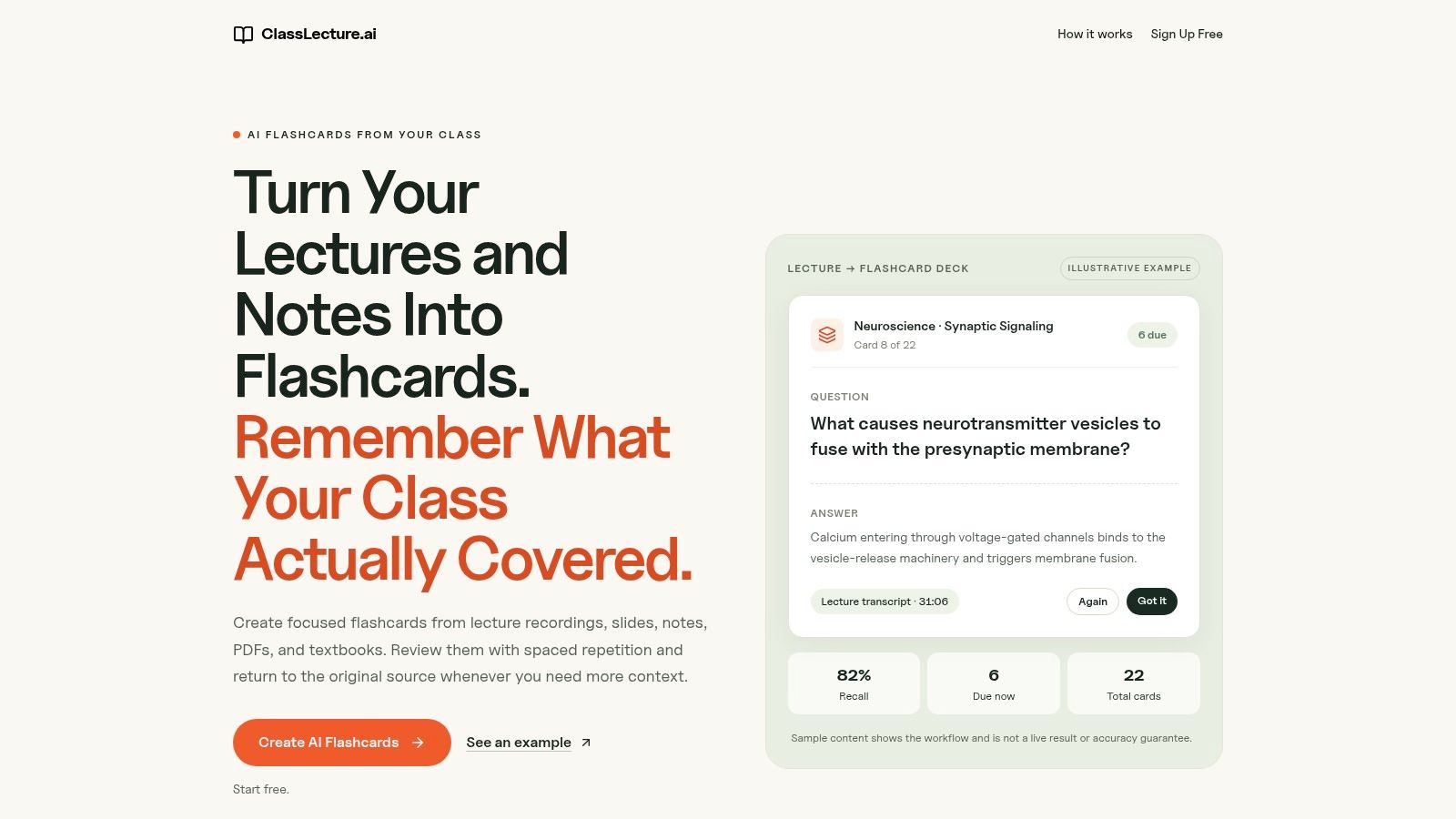
Each card links back to the exact lecture moment or document page it came from. That provenance separates a card you can repair from one you can delete. When a card on drug side effects won't stick, the fix is usually 40 seconds of the recording, not another hunt through your notes.
How the review schedule works
Timing runs on FSRS, the data-driven scheduler that estimates your recall probability per card and updates intervals from your own history. In benchmark data covering roughly 727 million reviews from about 10,000 Anki users, FSRS-6 reached a log-loss of 0.3460 against 0.416 for the older SM-2 scheduler, per benchmark results published by Retentio. A separate check across roughly 9,999 Anki collections found FSRS-6 produced lower prediction error than SM-2 for 99.6% of users.
You rate each card Again, Hard, Good, or Easy, and the rating drives the next interval, so honest ratings are the whole game. Cards come in question-and-answer and fill-in-the-blank formats.
- Course-grounded cards: lectures, recordings, notes, and textbooks feed the deck instead of generic content.
- Class-level review: due cards across a whole course surface together, with exam readiness shown per class.
- Low-friction trial: free sample decks cover Psychology 101 and English 101, and the free plan includes 3 flashcard decks per month.
The limits are real. Card quality tracks the clarity of what you upload, so a mumbling recording or a half-finished slide deck yields weaker cards. Try it on your worst-recorded lecture before you commit.
2. Anki
Anki is what every other tool gets measured against, and the reason is control. You edit card templates, attach audio, images, or LaTeX, and install add-ons that change how scheduling behaves. Desktop Anki is free on Windows, Mac, and Linux, and AnkiWeb keeps your collection in sync.
Adoption is not in question. A 2025 study of 120 medical students found 94% used Anki and 67.9% used it at least five days a week. The AnkiDroid 2024 roundup reported about 400,000 additional unique users on Android, taking the total from 2.8 million to 3.2 million during the year.
That same medical student study found 75% never or rarely kept up daily reviews after finishing a module. The scheduler doesn't build the habit for you, and a deck you stop opening is just a number.
- Customizable beyond reason: excellent for diagrams, formulas, and clinical detail, if you're willing to learn the settings.
- Shared decks: a fast start, but verify them against your instructor's slides before trusting them.
- Platform costs: desktop and Android are free, while the official iOS app is a paid one-time purchase.
Card creation is manual, so pair it with a guide to spaced repetition flashcards before you build 900 cards in one weekend and burn out.
3. RemNote
RemNote treats the note and the card as the same object. Write a bullet in your lecture notes, mark it for review, and it becomes a flashcard that stays attached to the surrounding context all semester. Nothing gets orphaned, and you can trace a bad card back to the paragraph that produced it.
The scheduler is the part worth comparing. RemNote supports both SM-2, the older interval-multiplier system, and FSRS, the model that learns from your review history. Switching between them for a week is the cheapest way to feel how differently two schedulers treat the same deck.
Where it fits and where it slows down
It fits students who already take structured notes and want review to grow out of them. It slows down everyone else, because the workspace asks you to learn its note hierarchy before you get any review done.
- Free plan: unlimited notes and flashcards, which is unusually generous for this category.
- Paid tiers: PDF annotation, image occlusion, and AI-assisted cards sit behind them.
- Exam scheduling: review plans can be tied to a test date rather than run indefinitely.
Practical rule: if you're switching schedulers mid-semester, export your collection first. Review history is the asset, and it doesn't always survive a move cleanly.
The interface is the tax. Expect a week of friction before the note-and-card model feels faster than plain Anki.
4. Quizlet
A classmate's Quizlet set can get you reviewing quickly before an exam. The risk is a mismatch: a shared set may summarize the course differently from your instructor's lectures or notes.
Quizlet's flashcard mode uses spaced repetition. Rate each card Repeat, Hard, Okay, or Easy, and set a daily limit for new cards. That limit helps keep the review queue manageable.
Spaced-repetition review is available on Quizlet's website, not its mobile app. If you study mainly on your phone, that limits access to this review method.
- Fast start: public sets and a familiar interface make it easy to begin.
- Mixed practice: quizzes and other study formats are available alongside flashcards.
- Tier limits: some study features are restricted on lower paid tiers.
Quizlet suits students who want a low-setup option or have a classmate's set that matches the course. Check a few cards against your notes before relying on the set.
5. Brainscape
Brainscape skips the interval math and asks you a simpler question after every card: how confident are you, on a scale of 1 to 5? Low-confidence cards come back sooner, high-confidence ones drift further out. That's Confidence-Based Repetition, and it removes the setup that scares people off Anki.
The design trade-off is honesty. A confidence rating is a judgement, not a measurement, and most students overrate recall when they've only just read the answer. Rate a card 4 because it looked familiar and the schedule believes you.
- No configuration: nothing to tune, which suits students who'd otherwise never start.
- Build and share: personal cards and media are free to create and study.
- Preloaded decks: medical and nursing topics are stocked, though they age.
Rate the card before you look at the answer, and rate it for whether you could explain it out loud, not whether you recognised it.
Advanced features and wider access to preloaded content are paid, so the free tier is best treated as a test of whether the rating habit suits you.
6. Knowt
Knowt's pitch is the core review loop, free. Spaced repetition runs on your own sets at no cost, with the same Again, Hard, Good, and Easy ratings the bigger schedulers use, plus adjustable new-card counts and intervals if you want to tune the load.
It also bundles the modes students alternate between: Learn, Practice Test, Match, and Flashcards. That matters more than it sounds when you're revising six topics, because switching apps mid-session is where review time disappears.
- Free core: unlimited flashcard sets and spaced repetition on your own sets.
- Adjustable intervals: changeable without learning an algorithm's internals.
- Paid AI tools: AI features are limited on the free plan, which is where the upgrade pressure sits.
The weak point is the same as any platform that accepts imports and shared sets. Check a sample of imported cards against the source lecture before you spend three evenings on them. If you're deciding between formats, this breakdown of study flashcards apps covers what separates a good card from a card that wastes a review.
7. StudySmarter
If your study life is already scattered across a notes app, a calendar, and three PDF readers, StudySmarter is trying to be the one tab you keep open. Flashcards, notes, study plans, and shared course materials live together, and card review uses an adaptive algorithm rather than a fixed interval you set yourself.
The adaptive label is worth pressing on. StudySmarter doesn't publish the scheduling model in the same detail as FSRS-based tools, so you can't inspect why a card came back today. For most undergraduates that's fine. For anyone optimising a two-week exam sprint, opacity is a real cost.
- All-in-one: routine study tasks stop being separate apps.
- Formatted cards: smart formatting includes visual aids on cards.
- Offline study: listed as a feature, which helps on commutes and in exam halls with bad Wi-Fi.
The downside of breadth is weight. There's more interface here than a learner who only wants a scheduler needs, and shared resources may not match your instructor's version of the course. Premium pricing also varies by plan and region, so check before budgeting.
8. Mochi
Mochi is for the student who keeps a Markdown vault and wants review to live inside it. Cards sit beside notes, linked references, and tags, all searchable. You can start without an account, work offline on desktop, mobile, or web, and the free plan includes unlimited cards and decks.
That combination suits research-heavy courses where the value is in the connections between ideas, not in isolated facts. It's also fast to import and export, which is more than most tools in this list can say.
One caution. The free web version stores your content in browser storage. Clear your cache carelessly and it's gone, so export a backup before you tidy anything.
- No account needed: open it and start typing.
- Free and unlimited: cards and decks on the free plan.
- Sync is Pro: cross-device syncing sits behind the paid tier, which is the obvious gap for anyone studying on two machines.
If you want a single-purpose flashcard app with a clean phone review screen, the note-linked workflow here will feel like overhead. If you already write in Markdown, it'll feel like the obvious choice.
9. SuperMemo
Spaced repetition has a longer paper trail than most students realise. German psychologist Hermann Ebbinghaus described the forgetting curve in the 1880s, and in 1939 H. F. Spitzer tested spaced review with more than 3,600 sixth-grade students in Iowa learning science facts. In the 1970s, Sebastian Leitner turned the idea into a flashcard procedure with mastery-based boxes and expanding intervals, as the history of spaced repetition records. Retrieval, performance-based scheduling, and growing intervals have been the architecture for roughly 140 years.
SuperMemo is the tool that grew directly out of that lineage. Its Windows software combines review scheduling with incremental reading and PDF workflows, so a chapter you're reading gets broken into items as you go rather than after the fact.
- Reading becomes review: import PDF, EPUB, email, web pages, and images, then extract items.
- Scheduling variety: Algorithm Arena lets you compare scheduling algorithms.
- One-time licence: SuperMemo 20 for Windows is sold that way.
The cost is commitment. It's Windows-only, and the workflow is more involved than a flashcard app. If you want the interval logic explained before you commit, this breakdown of the spaced repetition schedule is the faster read.
10. StudyFetch
StudyFetch starts where your material already is. Upload PDFs, slides, notes, or lecture content and it generates flashcards in term-definition and fill-in-the-blank formats. Missed cards come back sooner, and mastery is tracked by topic, so weak areas surface instead of hiding inside an average.
The platform goes wider than cards. Notes, quizzes, study guides, and study planning sit in the same account, which suits a student who wants one dashboard rather than four tabs.
- Starts from your files: no blank deck required.
- Weak-topic tracking: mastery by topic makes revision decisions easier.
- Free to start: paid plans add generations and longer-file support.
AI-generated cards need checking, particularly in technical subjects where a subtly wrong definition is worse than no card. Read each generated card against its source page before it enters your review queue. And if you want a minimalist scheduler, this is a broader study platform than you're asking for.
How the 10 spaced repetition tools compare on scheduling, free access, and best use
The main choice is how much control you want over review, and whether you're starting with existing course material or building cards yourself. These tools pair different scheduling methods with different workflows.
| Item | Scheduling method | Free option | Best for | Main limitation |
|---|---|---|---|---|
| Ai Flashcards | FSRS with Again, Hard, Good, and Easy ratings | Free sample decks; usage limits apply | Turning course materials into flashcards | Card quality depends on source material |
| Anki | Schedules reviews based on recall | Free desktop software and AnkiWeb sync | Customizable, long-term flashcard study | Settings can take time to learn; official iOS app is paid |
| RemNote | SM-2 or FSRS | Free plan includes unlimited notes and flashcards | Linking notes and flashcards in one workspace | Advanced features are paid |
| Quizlet | Spaced repetition with recall ratings | Public study sets and free study options | Quick flashcard practice with other study modes | Spaced-repetition review is website-only |
| Brainscape | Confidence-Based Repetition with 1–5 ratings | Creating and studying personal cards is free | Simple review without configuring intervals | Advanced features and wider deck access are paid |
| Knowt | Again, Hard, Good, and Easy ratings; adjustable intervals | Free spaced repetition on personal sets | Combining flashcards with tests and other practice modes | Free AI features are limited |
| StudySmarter | Adaptive spaced repetition | Free account for core learning features | Organizing study materials across courses | May offer more features than a simple scheduler requires |
| Mochi | Spaced repetition | Free plan includes unlimited cards and decks | Combining flashcards with Markdown notes | Cross-device syncing requires Pro |
| SuperMemo | Individualized scheduling based on review history | No free tier; SuperMemo 20 for Windows is a one-time paid licence | Committed learners linking reading with review | Windows software is platform-limited and involved |
| StudyFetch | Missed cards return sooner; mastery tracked by topic | Free-to-start access | Generating cards from course files and using broader study tools | AI-generated cards need checking |
Matching Your Review Tool to How You Actually Study
Choose a tool around the material you need to review. If your course depends on recorded lectures, a system that turns recordings into searchable transcripts and flashcards can reduce the work of building a deck. If your notes are already organized, a tool that links cards to notes may fit better.
Consistency matters more than a complicated schedule. A 2025 study of Anki use among 53 students found that 43 completed the full assessment and 80% used Anki, with wide variation in card counts and daily use. A tool only helps if its creation process and daily workload fit your routine.
Scheduling methods differ, but the study task remains recall: try to retrieve an answer before revealing it. A 2025 primary-school study found retrieval practice improved learning, while differences in spacing intervals did not produce a statistically significant performance benefit. Its meta-analysis reported a small-to-medium advantage for spaced over massed practice (g = 0.28 across 27 studies). For a busy term, choose a schedule you can sustain, then use it to practise retrieving course material.
Plan for the weeks when work shifts, placements, or deadlines leave little study time. A long queue of due cards can turn an ideal schedule into an unmanageable task. Look for ways to focus a short session on the course or exam that needs attention, and choose a workload you can keep up with.
Give your shortlist a short trial. Check AI-generated cards against their source, and watch whether the review queue stays manageable. Keep the tool that makes it easier to return to the right material. If you want to compare practice methods alongside the apps, these practice tools from Theory Bookings cover the study side.
ClassLecture.ai suits students whose study starts with recorded lectures rather than blank decks. It creates timestamped transcripts and flashcards linked to the exact lecture moment, with spaced repetition to support review. You can record a lecture in the browser or upload one, then review cards organized by class and term. Start at ClassLecture.ai.
The ClassLecture.ai Team
We build ClassLecture.ai, the AI study assistant that turns your recorded lectures into transcripts, summaries, flashcards, and answers cited to the exact timestamp — so you learn faster from your own professor's words.
Keep reading
The Best Spaced Repetition App: 10 Options Compared
Compare the best spaced repetition app options by algorithm, device support, syncing, and course load. Find the right fit for your study routine.
ReadBest Way to Make Flashcards: Active Recall That Sticks
Learn the best way to make flashcards: write active-recall questions, use cloze cards, source them from lectures, and review with FSRS scheduling.
ReadSpaced Repetition Flashcards: A Complete Guide for 2026
Master any subject with spaced repetition flashcards. Learn the science-backed strategy to improve memory and ace your exams in 2026.
Read