Study Flashcards Online: How to Build a Review Routine
Learn how to study flashcards online with spaced repetition, source-checked cards from your lectures, and a review schedule you can follow.
Replaying a recorded lecture feels productive because the material becomes familiar. But familiarity isn't the same as being able to recall an idea when your notes aren't in front of you. If your online flashcard routine only adds more cards without checking whether they're accurate or useful, you can spend hours reviewing and still miss what the exam asks.
A medical education study illustrates the gap between liking flashcards and proving they improve results. In a 2021 study, 101 first-year medical students were included in the final analysis, and 58 used electronic flashcards. Those students reviewed a median of 660 cards over 2.95 hours; 87% said the cards were helpful, but researchers found no statistically significant association between flashcard use and final exam scores in the study of first-year medical students. The practical lesson isn't to avoid cards. It's to make retrieval, accuracy, and exam-style practice part of the routine.
Table of Contents
- Your Online Flashcard Routine at a Glance
- Build and Audit Cards You Can Trust
- How Spaced Review Schedules Your Cards
- How to Run a Focused Study Session
- Confirm Your Cards Are Enough and Start This Week
Your Online Flashcard Routine at a Glance
Use the steps below to turn a lecture into a small, checkable review system. The time estimates are starting points, not targets to hit at the expense of checking the cards.
| Step | What You Do | Time Estimate |
|---|---|---|
| 1. Load the lecture | Upload the recording or transcript and check technical terms in the transcript. | 10–15 minutes per lecture |
| 2. Generate and edit cards | Review the generated question-and-answer and fill-in-the-blank cards, remove weak ones, and add 5–10 of your own. | 15–25 minutes per lecture |
| 3. Review on schedule | Answer each due card, then rate it Again, Hard, Good, or Easy. | 10–20 minutes per day |
| 4. Test before checking | Try to answer from memory, then open the linked lecture timestamp or textbook page to verify the answer. | Built into each review |
| 5. Switch to practice | Move to practice questions or explanations when cards stop helping you improve. | Weekly check |
The order matters. Start with the source, not a generic deck. Edit for accuracy and clarity before memorizing. During review, answer before revealing the back of the card, then check the timestamp or page so you know the answer reflects the material your course covers.
A card count is a poor measure of readiness. A deck can feel satisfying to finish while leaving you unable to explain a process or apply a concept to a new question. Keep flashcards for facts and distinctions you need to retrieve quickly; add practice problems when the exam requires reasoning.
Pick one class and run this routine for two weeks before deciding whether it works for you. Track which cards keep tripping you up and whether you can use the material in questions beyond the deck. That gives you more useful feedback than adding another batch of cards whenever studying feels uncomfortable.
Build and Audit Cards You Can Trust
A polished flashcard can still be wrong. If an answer doesn't match the lecture or textbook, repeated review makes the mistake easier to recall, not safer. Build from your course materials, then check each card against the exact timestamp or page before you learn it.
Build the deck from the source
-
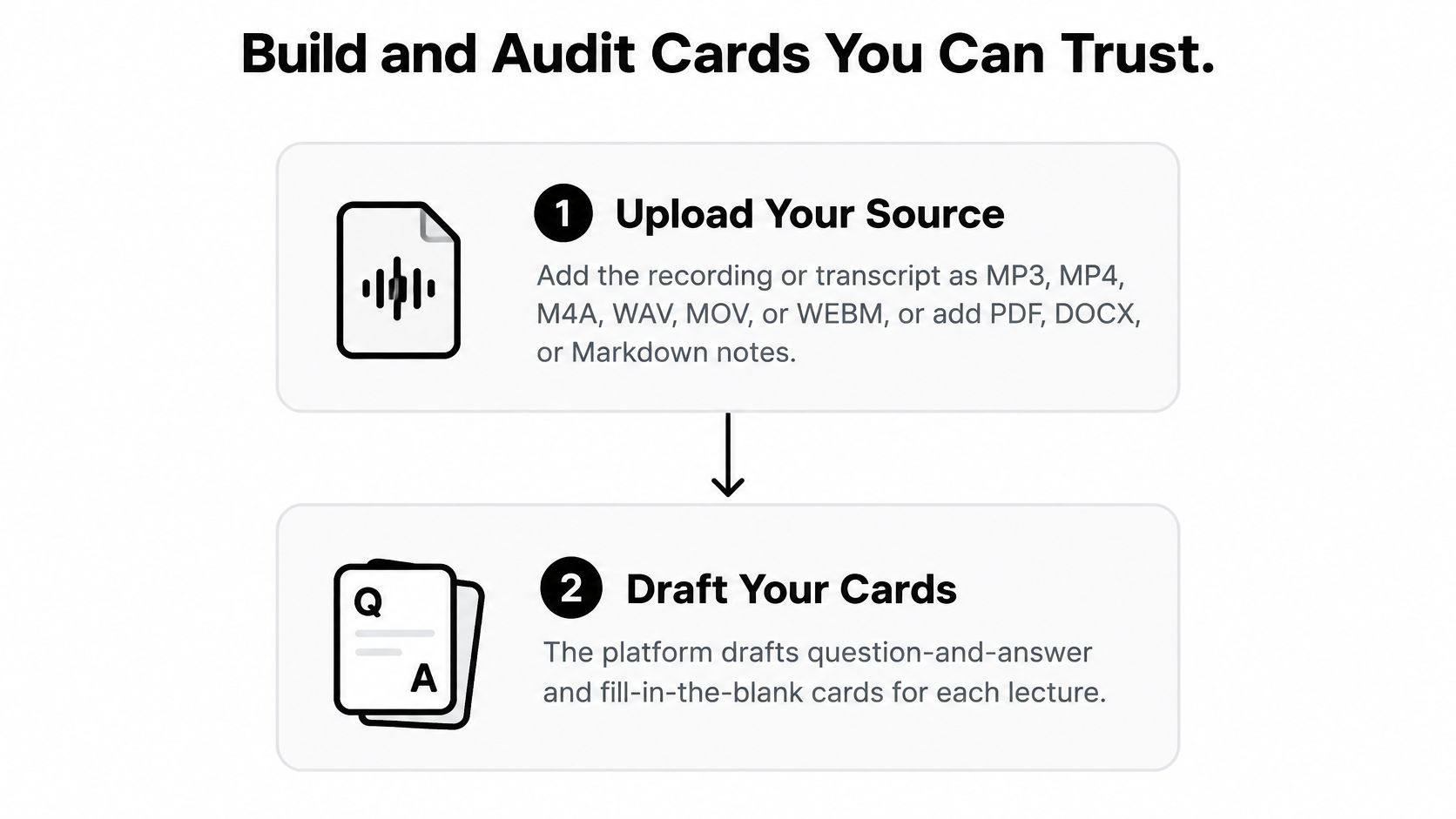
Upload a lecture or reading. Use the recording or transcript, or add course notes and textbook pages. Common supported formats include MP3, MP4, M4A, WAV, MOV, WEBM, PDF, DOCX, and Markdown. If you're using a transcript, scan technical terms before generating cards. Speech recognition can turn a specialized word into something that sounds plausible but changes the meaning.
-
Draft cards, then edit them. Let the platform produce question-and-answer and fill-in-the-blank prompts, but treat them as drafts. For every card, open its timestamp or page reference and confirm that the source supports the answer. If the platform can't show the source, you can't check whether it captured the lecturer's wording or added an unsupported detail.
-
Turn recall into application. A prompt like “What is negative reinforcement?” checks a definition. An application version asks what principle is illustrated when a driver buckles a seat belt to stop a beeping chime. Keep the first card if the definition matters, but add the scenario if you need to recognize the principle in context.
-
Tag by thinking task. Label cards recall, explain, or apply. Recall cards test a term or short fact. Explain cards ask you to describe a process in your own words. Apply cards require you to use the idea in a scenario. Add a handful of cards based on what the lecturer repeated or emphasized, but confirm those details in the source too.
For a practical reference on writing concise prompts, use this guide to flashcard question-and-answer examples. The aim isn't to preserve every slide. It's to keep the facts you need and write prompts that make you retrieve the right kind of understanding.
Audit weak cards before reviewing
A 2025 quasi-experiment involving 799 first-year nursing students across 19 Norwegian campuses found that students who used teacher-made digital flashcards had a medium-sized final-exam advantage, with d = 0.42. The study also found higher odds of passing and earning the highest grade among users, but only about one-third of students in the intervention group used the cards. Since the materials were teacher-made, those results don't establish that automatically generated cards will have the same effect. A separate experiment with 30 undergraduates found no significant short-term test-score difference between equivalent flashcards and handouts. These findings, summarized in the 2025 report on flashcard use and learning, make card quality and how you use a prompt more important than assuming the format does the work.
| Card Failure | Fix |
|---|---|
| Answer runs past a sentence or two | Split the card into smaller prompts. |
| Card copies a slide heading | Rewrite it as a question about the underlying idea. |
| Two answers would both be correct | Narrow the prompt so only one answer fits. |
| Card asks only for a name | Convert it to an application prompt. |
| No timestamp or page reference | Flag it as unsupported and don't memorize it yet. |
| Polished summary rather than a question | Rewrite it as a question the source can answer. |
AI can speed up drafting, but it doesn't remove the need to check what the tool heard or where an answer came from. A 2025 study of 1,537 university students identified privacy concerns and limited Arabic-language tools among student concerns, as reported in the ERIC record on student perspectives about AI. Check a platform's privacy information, language support, and course rules before uploading materials or relying on generated cards. If your institution requires disclosure of AI-assisted work, follow its policy and keep a clear record of what you used the tool to do.
Any card you can't trace to a source is flagged, not memorized.
How Spaced Review Schedules Your Cards
Anki, released on 5 October 2006, scheduled cards according to recall performance rather than showing every card at the same interval, as described in the history of Anki. That's the useful idea behind spaced repetition: a card you struggle to retrieve returns sooner, while a card you recall confidently can wait longer. The schedule responds to your answers instead of making you review every item equally often.
Use the four ratings to report what really happened, not how much you hope you know:
| Rating | When to Choose It | What Happens Next |
|---|---|---|
| Again | You couldn't recall the answer or needed a hint. | The card returns soonest, often later the same day or the next day. |
| Hard | You recalled it correctly, but only with real effort. | The next interval is shorter than it would be for Good. |
| Good | You recalled it correctly after a short pause. | The interval grows at a normal pace. |
| Easy | You recalled it instantly and without effort. | The card is pushed furthest out, so use this sparingly. |
Rate honestly, even when the queue is long
The common scheduling mistake is rating cards too generously. Pressing Easy to clear a session stretches the interval, so cards you haven't mastered can disappear from your review queue. A quick, shaky guess isn't a Good, and recognizing the answer after revealing it doesn't count as recalling it.
Early reviews can feel frequent because difficult cards need attention before the scheduler has enough successful reviews to space them further apart. That's not a sign the system has failed. It's a reason to keep your daily session manageable and use the ratings consistently. If a card's wording is ambiguous, fix the wording rather than repeatedly giving yourself credit for a lucky guess.
When your study tools organize material by class, use the class-wide due view to see cards across lectures and documents in one queue. Check the exam readiness widget for that class as a separate signal of whether your current review is keeping pace. Neither a tidy queue nor a reassuring readiness display proves you can answer unfamiliar exam questions, so keep testing yourself outside the cards as well.
If you want to compare how review schedulers work before choosing a tool, this guide to spaced-repetition apps offers another point of reference. The rule during review stays simple: rate truthfully. If you can't say why you chose a rating, choose Hard.
How to Run a Focused Study Session
Start with the cards already due for the class you're studying, not a fresh batch. The scheduler needs accurate answers to set sensible review intervals, and a pile of new cards can distract you from material that's ready to revisit.

For each card, say or write the answer before you reveal it. Flipping straight to the back builds familiarity with the wording, but it doesn't show whether you could produce the answer without help. Keep new cards capped at a manageable number; 10–15 per day is a reasonable starting point, then adjust after a week based on how long your reviews take and whether overdue cards are accumulating.
Mix formats to match the skill you're testing. A short definition can work as question and answer; a fill-in-the-blank card can test a precise term. For a process or principle, use a scenario. For a concept with several connected parts, explain it aloud and check your explanation against the source afterward.
| Format | Example Prompt | Best For | Weak Spot |
|---|---|---|---|
| Question and answer | What does spaced practice mean? | Definitions and short facts | Can reward recognition instead of recall. |
| Fill in the blank | Retrieval practice strengthens memory more than ____. | Exact terms and wording | Can reward matching the word shape. |
| Scenario | A driver buckles up to stop a beeping chime. Which principle applies? | Reasoning and application | Takes longer to write and check. |
| Explain aloud | Explain the difference between correlation and causation in your own words. | Concepts and connections | Has no automatic check, so verify against the source. |
Change the prompt when the same card keeps failing
If a topic keeps returning as Again, don't automatically add more cards that ask the same question. Try turning the next review into a scenario prompt. For example, if you can recite a definition but can't recognize it in context, the problem is application, not a shortage of definitions.
Finish by writing down the card you got wrong most often and opening its source. Look for context that the card left out, a technical term the transcript misheard, or a question that permits several plausible answers. Then revise the card or flag it. For further ideas on choosing different study methods, see this guide to effective learning techniques.
A short video can also help you think about how you want to structure a review session:

Keep the session focused: answer due cards, review a limited number of new ones, then investigate the most persistent miss. If an explanation takes more than a few sentences, or the question requires working through several steps, use the card to identify what to practice next rather than treating a correct flip as proof that you're exam-ready.
Confirm Your Cards Are Enough and Start This Week
Flashcards work well for recall-heavy material, including terms, definitions, and short lists. They are less suited to explaining processes, interpreting evidence, or solving multistep problems. If a topic still earns Again after you have rewritten it as a scenario, practise with questions, use lecture Q&A to explain the concept, or draw the process.
Check the class exam readiness widget, but treat a flat or falling score as a reason to adjust your practice, not automatically add cards. A larger deck will not address a mismatch between recall practice and the skill the exam requires.
Start with one class
Keep the first week manageable:
- Choose one class: Upload a lecture recording, transcript, or set of notes.
- Trim the draft: Keep the strongest 20–30 cards, checking each against its exact source timestamp or textbook page before memorizing it.
- Review daily: Complete due cards first, then add 10–15 new cards per day.
- Check your pattern: After seven days, find cards repeatedly rated Again and practise those topics another way.
Free sample flashcards for Psychology 101 and English 101 are available without an account. Treat flashcards as one part of revision, not a promise of a passing grade.
ClassLecture.ai turns uploaded or recorded lectures, notes, and textbooks into transcripts, flashcards, and study materials linked to their sources. Start with one lecture, verify each card against its timestamp or page, and build a review routine around your course content at ClassLecture.ai.
The ClassLecture.ai Team
We build ClassLecture.ai, the AI study assistant that turns your recorded lectures into transcripts, summaries, flashcards, and answers cited to the exact timestamp — so you learn faster from your own professor's words.
Keep reading
AP Psych Unit 9: Social Psychology Topics and Study Plan
Master AP Psych Unit 9 social psychology: key topics, exam traps, and how to turn lectures into timestamped summaries and flashcards with ClassLecture.ai.
ReadFlashcards Questions Answers: 8 Proven Examples
Explore 8 proven flashcards questions answers examples—from Leitner boxes to AI-generated Q&A cards made from your own lecture transcripts.
ReadPolyatomic Ions Flashcards for Better Chemistry Recall
Use polyatomic ions flashcards to learn formulas, names, charges, charge-balancing rules, and spaced-repetition study routines for introductory chemistry.
Read