Flashcards Questions Answers: 8 Proven Examples
Explore 8 proven flashcards questions answers examples—from Leitner boxes to AI-generated Q&A cards made from your own lecture transcripts.
Flashcards don't earn their place in a study routine just because they test you. A meta-analysis of spaced practice and retrieval found an advantage for spaced over massed practice, with g = 0.28 across 27 studies and 53 effect sizes, while the average testing-versus-restudying effect was smaller and statistically inconclusive. The practical lesson is narrower than “flashcards always win”: how you structure and repeat practice matters.
Re-reading notes or replaying a lecture lets you follow an explanation with the answer already present. A question-and-answer card asks something different: can you produce the answer before checking? That's the distinction to build your review around, not how familiar the slide looks.
For students searching for flashcards questions answers, the useful starting point isn't a giant downloaded deck. It's a focused question, a checkable answer, and a plan for seeing that question again.
- Make retrieval visible. Say or write your answer before revealing the back.
- Make correctness judgeable. Decide what the answer must contain.
- Make review repeatable. Use a box system or scheduler instead of reviewing only when an exam feels close.
Paper cards, algorithmic scheduling, integrated notes, and AI-generated decks solve different parts of that workflow. None can rescue an ambiguous question or an incorrect answer. The strongest approach combines manageable prompts with source checking, then adds application questions when factual recall becomes reliable.
Table of Contents
- 1. Leitner System (Box Method)
- 2. SuperMemo and the SM-2 Algorithm
- 3. Anki Basic Q&A Cards with FSRS Scheduling
- 4. Quizlet Q&A Flashcards and Learn Mode
- 5. Brainscape Confidence-Based Flashcards
- 6. RemNote Integrated Notes and Flashcards
- 7. Cornell Notes Cue-Column Q&A Method
- 8. Shared Medical Anki Decks for Exam Review
- 8-Method Flashcard Q&A Comparison Table
- Turn Your Next Lecture Into a Q&A Deck
1. Leitner System (Box Method)
A physical sorting system makes your review decisions visible. In 1972, Sebastian Leitner published the flashcard method in which correct answers move to less frequently reviewed boxes and incorrect answers return to more frequent review, as described in the history of spaced repetition.
The box arrangement illustrates the central decision: which questions need another attempt sooner?

Consider a nursing lecture on patient assessment. Rather than putting an entire assessment sequence on a card, ask for a particular distinction your instructor emphasized, then write the expected distinction on the back. Keep the lecture reference beside it so you can resolve disagreements without guessing.
Make movement depend on an actual answer
Choose a frequent review routine for the starting box and progressively longer gaps for higher boxes. Answer before turning the card over, then move it according to whether you met the answer criteria.
- Use a narrow prompt. Ask about a defined concept, not an entire lecture topic.
- Return missed cards promptly. Don't promote a card because the answer looked familiar.
- Rewrite recurring failures. Check whether the problem is unclear wording, missing understanding, or genuine forgetting.
This demonstration provides a visual companion to the sorting process.
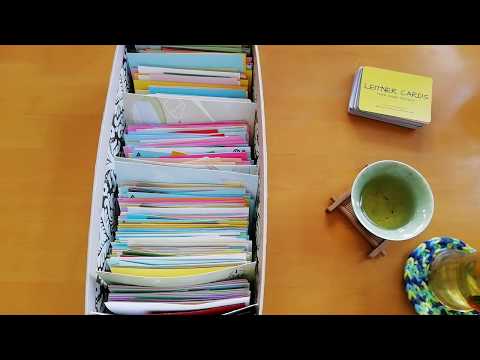
The trade-off is administration. Paper keeps the process understandable, but you must maintain the schedule and move the cards yourself. It's a sensible starting point for a focused topic; consider digitizing when managing the boxes starts taking attention away from answering questions.
2. SuperMemo and the SM-2 Algorithm
The important shift from boxes to algorithms is per-card scheduling. Instead of placing every moderately difficult question into the same physical group, you use review feedback to guide when an individual question should return.
SuperMemo and SM-2 belong to this algorithmic approach. For practical study, the useful principle isn't memorizing the scheduling formula. It's recognizing that your feedback becomes part of the review process, so careless ratings undermine the information you give it.
Suppose you're reviewing a construction-safety lecture. You recall the name of a procedure immediately but struggle to explain the condition that triggers it. If the card asks for both, a single rating hides the difference between what you know and what you don't.
Practical rule: If you can't rate the whole answer honestly, split the question.
Give the scheduler a clean signal
Make separate prompts for the procedure's name, its triggering condition, and any exception emphasized in the course. Keep the original lecture or assigned reference attached to each answer.
A correct answer that required substantial effort shouldn't receive the same assessment as immediate, complete recall. Equally, don't mark a card as failed just because your wording differed from the answer while preserving its meaning.
- Define the required content. Identify the essential phrase or distinction before reviewing.
- Distinguish effort from failure. Difficult retrieval and incorrect retrieval aren't interchangeable.
- Fix the card before changing the schedule. No interval adjustment clarifies a vague prompt.
Use the spaced-repetition app guide to compare study workflows rather than choosing on algorithm names alone. The trade-off is convenience versus transparency: automated timing removes manual sorting, but you still need to understand what you're rating.
3. Anki Basic Q&A Cards with FSRS Scheduling
The front of the card deserves more editing than most learners give it. In an Anki Basic Q&A workflow, a prompt such as “Explain inflammation” is difficult to score because it doesn't specify the expected scope.
A better lecture-derived prompt asks for the particular distinction being taught. For example, ask how the instructor distinguishes a local response from a systemic response, then put the course-specific explanation and source reference on the back.
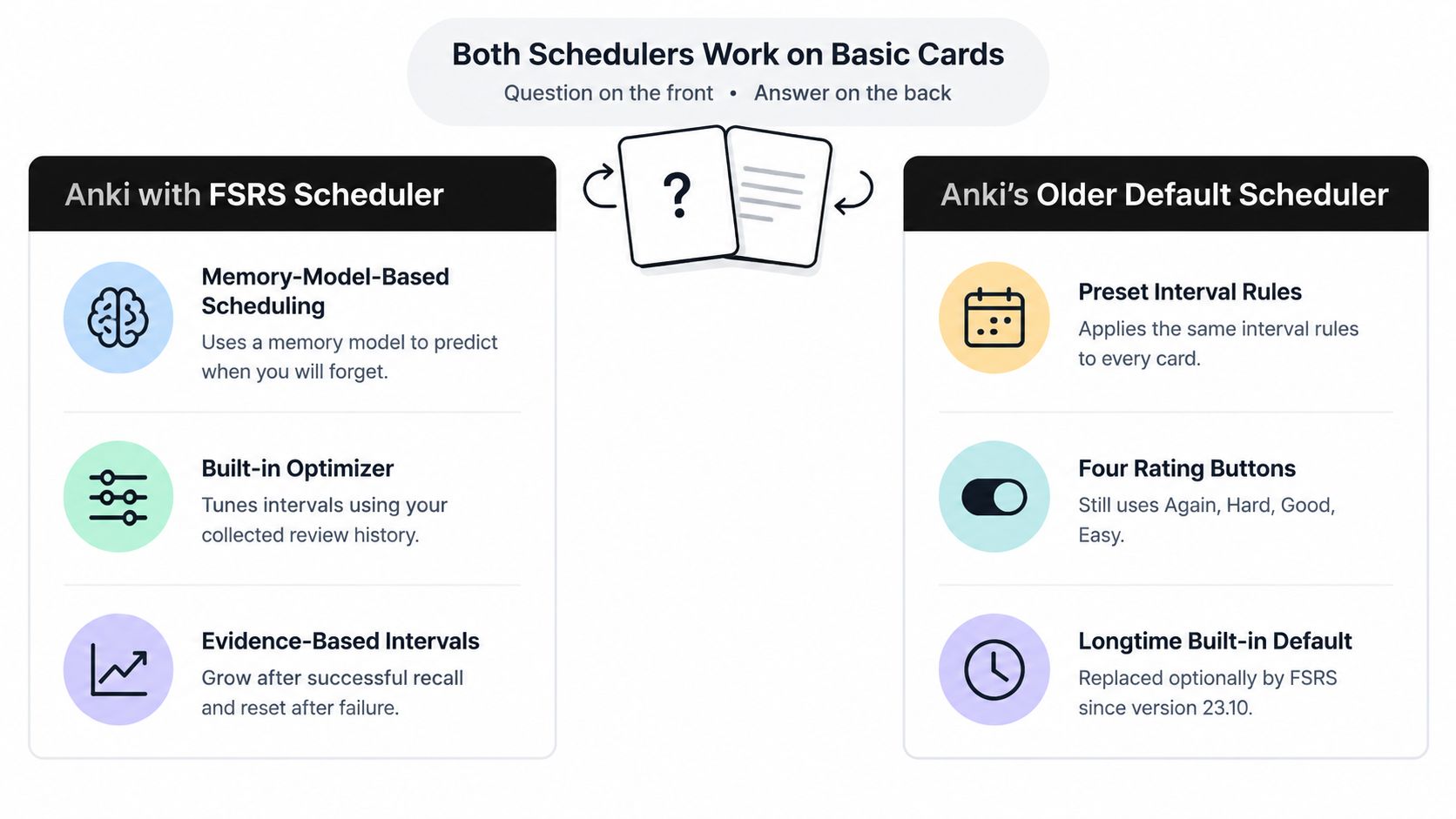
The scheduler comparison below illustrates the timing side of the workflow.
Separate card quality from scheduling quality
When using Anki with FSRS, treat scheduling and content editing as different jobs. Review settings won't tell you whether a shared card matches your instructor's terminology or whether an answer omitted an important qualification.
For a lecture-heavy biology course, create focused cards from the material you need to explain. Keep broader mechanisms in your notes, then link cards to that explanation rather than placing the whole explanation on every back.
- Use “Again.” Recognizing the revealed answer isn't successful retrieval.
- Reserve easier ratings for easier recall. Don't rate according to how much you wish to avoid seeing the card.
- Inspect imported material. Check terminology, scope, and source alignment before adding it to regular review.
The main trade-off is maintenance. A carefully edited personal deck can fit your course closely, but importing more cards creates more material to verify and maintain. If reviews become unmanageable, pause new additions and inspect the cards you repeatedly miss before assuming you need more study time.
4. Quizlet Q&A Flashcards and Learn Mode
A vocabulary set and an explanation deck shouldn't use identical prompts. For a language class, a term-and-definition pairing may match the task; for a nursing lecture, naming a term may be only the beginning of what you need to demonstrate.
Use Quizlet Q&A sets with that distinction in mind. Start by identifying whether you're practicing recognition, producing an answer from memory, or explaining a relationship.
Digital cards are convenient to review, but the format doesn't determine the depth of the question.

Don't confuse selecting with producing
When using Learn mode or another guided activity, follow it with an answer-hidden pass. Read the question, produce the answer without visible alternatives, and only then check it.
For a psychology lecture, you might begin with a term and its definition. Follow that with a separate prompt asking which feature distinguishes the concept from a related concept. Use the explanation from your course rather than inventing a distinction from memory.
- Verify shared sets. Compare answers with assigned readings and lecture notes.
- Shorten overloaded prompts. A question should make the expected task obvious.
- Add later review. Completing an initial learning activity shouldn't be your final encounter with the material.
The trade-off is ease versus depth. A quick set can be useful for terminology, but rapid completion doesn't demonstrate that you can explain a mechanism or handle an unfamiliar example. Keep straightforward definition cards where they belong, then add questions that require the kind of answer your course assesses.
5. Brainscape Confidence-Based Flashcards
Confidence is useful feedback only after you've attempted an answer. If you read the back first and then judge how well you knew it, you're assessing familiarity with a visible explanation rather than independent recall.
For a Brainscape confidence-based workflow, keep the order consistent: read the prompt, answer aloud or in writing, reveal the back, then assess your performance. Don't substitute a feeling of recognition for the answer you produced.
Confidence should describe the retrieval attempt you just made, not your reaction to seeing the solution.
Consider a safety learner reviewing when a procedure applies. A confident statement of the procedure's name isn't enough if the question asks for the condition requiring it. Rate against that condition, including any limitations specified in the course.
Calibrate confidence against evidence
Write a brief answer standard on the back. It should make clear which element is essential and which wording is optional, so you don't punish accurate paraphrasing or reward incomplete answers.
- Compare prepared material with your syllabus. A polished deck can still cover the wrong scope.
- Record the missing element. Note whether you forgot a condition, exception, sequence, or definition.
- Rewrite misleading successes. If a prompt gives away its answer, remove the clue before treating it as mastered.
The trade-off is self-assessment. Confidence ratings encourage reflection, but they still depend on honest, consistent judgment. When you repeatedly feel certain and then discover an omission, don't merely lower the rating; tighten the question and answer criteria.
For complex topics, keep explanation practice alongside the deck. Being confident about a short answer doesn't establish that you can defend the reasoning behind it.
6. RemNote Integrated Notes and Flashcards
Separating notes from cards creates an editing problem: you correct the explanation in your notes but forget to correct the copied answer. An integrated notes-and-flashcards workflow is worth considering when that mismatch becomes a recurring concern.
With RemNote, approach the lecture outline as a source for questions rather than a collection of sentences to convert indiscriminately. Preserve the explanation in context, then select the parts that warrant independent retrieval.
For a physiology lecture, keep the mechanism under its topic heading. Build a focused question about a particular relationship, with the fuller explanation nearby for review when you miss it.
Write prompts that survive outside the outline
A question such as “What happens next?” may make sense beneath a lecture heading but become ambiguous in a mixed review session. Include enough context to identify the process without revealing the answer.
The flashcard practice guidance from Genio recommends using focused questions and keeping cards short rather than copying large chunks of material. Apply that editing standard before converting an outline into a deck.
- Retain the parent concept. Include the relevant process, system, or comparison in the prompt.
- Separate explanation from the required answer. Keep the scored response concise while preserving context nearby.
- Review after revising notes. Confirm that a corrected explanation hasn't left an outdated card behind.
The trade-off is structural complexity. An elaborate outline can become another project to maintain. Use enough organization to find and verify answers, but don't spend the study session perfecting nested headings.
Not every note needs a card. Keep extended arguments, worked examples, and unresolved questions in their fuller form until you can identify a useful retrieval task.
7. Cornell Notes Cue-Column Q&A Method
You don't need separate cards to begin asking retrieval questions. With a Cornell-style page, put lecture notes in the main area, questions in the cue column, and a concise synthesis in the summary area.
Then cover the notes and answer the cues. The useful change is simple: the page becomes something you can test yourself with, not just something you can reread.
A notebook can hold both the explanation and the prompts used to retrieve it.

Turn headings into answerable cues
For a history lecture, “Causes” is a label, not a question. A stronger cue asks which cause the lecturer treated as decisive and what evidence supported that interpretation.
For construction or occupational-safety coursework, ask about the condition or distinction explained in the lesson. Preserve the course's jurisdiction and context rather than merging requirements from different training pathways.
- Write cues while the lecture is still clear. Resolve uncertain notes before turning them into answers.
- Hide the explanation. Answer aloud before uncovering the main column.
- Keep source references. Add the recording location or document page needed to verify the response.
Use this guide to flashcards for study notes when deciding which cues deserve separate cards. Select questions you'll need to revisit, not every heading on the page.
The trade-off is scheduling. Cue-column self-testing gives you an accessible starting point, but you still need a way to revisit older pages. Transfer durable questions into a spaced-review system while leaving extended explanations in the notebook where their context remains visible.
8. Shared Medical Anki Decks for Exam Review
Shared medical decks offer a starting pool of questions, not permission to skip verification. Treat them as material to inspect against your course rather than as an authoritative replacement for lectures and assigned references.
There is relevant evidence for digital cards, but its limits matter. A controlled nationwide nursing-education quasi-experiment examined 799 students across 19 Norwegian campuses and reported better examination performance among flashcard users, with Cohen's d = 0.42. Those were teacher-made digital cards, not community Anki decks or automatically generated material.
Useful evidence for structured flashcard practice isn't proof that an arbitrary downloaded deck fits your examination.
Audit shared cards before adding volume
For a pharmacology lecture, compare a shared answer with the assigned text and the instructor's explanation. If they differ, identify whether the issue is wording, scope, missing context, or an actual disagreement before memorizing either version.
- Start with relevant topics. Don't activate an entire collection merely because it's available.
- Control new-card additions. Leave enough capacity to review existing material and correct errors.
- Add lecture-specific prompts. Include distinctions your instructor emphasizes that the shared material omits.
For a focused anatomy topic, the cranial nerves flashcards guide can help frame a narrower review task. Pair factual prompts with questions about relationships and application when your course requires them.
The trade-off is saved drafting versus verification work. Shared cards can reduce blank-page effort, but you inherit their wording and assumptions. Keep a personal, source-linked layer alongside them, especially for clinical scenarios where a short answer may omit necessary context.
8-Method Flashcard Q&A Comparison Table
| Method | 🔄 Implementation Complexity | ⚡ Resource Requirements | 📊 Review Approach and Expected Outcome | ⭐ Key Advantages | 💡 Ideal Use Cases |
|---|---|---|---|---|---|
| Leitner System (Box Method) | Low; manually move cards between boxes | Physical cards and containers; no software | Fixed intervals lengthen as recall improves; weak cards return to frequent review | Free, offline, and easy to start | Small card sets and learners who prefer a simple, hands-on routine |
| SuperMemo and SM-2 | Moderate; rate each card's recall from 0 to 5 | SuperMemo software or another SM-2-based tool | Adaptive intervals adjust to recall ratings and card difficulty | Established algorithm that influenced many later systems | Learners seeking algorithmic scheduling and willing to rate recall consistently |
| Anki Basic Q&A with FSRS | Moderate to high; requires card setup and scheduler configuration | Anki app, review history for optimization, and time to create cards | FSRS adapts intervals using memory modeling and review history | Highly customizable, with strong scheduling and shared decks | High-volume, long-term study across subjects such as medicine, languages, or law |
| Quizlet Q&A Flashcards and Learn Mode | Low; sets are quick to create and share | Web or mobile platform; some features require a paid plan | Learn mode adapts to errors, with games and tests for practice | Easy sharing and engaging study modes | Quick vocabulary practice, class review, and initial mastery |
| Brainscape Confidence-Based Flashcards | Low to moderate; rate confidence after revealing answers | Web or mobile platform; some features and decks may require payment | Confidence ratings guide review frequency | Encourages reflection and offers ready-made decks | Learners who benefit from confidence judgments and prepared study materials |
| RemNote Integrated Notes and Flashcards | Moderate; requires learning note structure and card syntax | RemNote app; some advanced features may require a subscription | Creates cards within notes and schedules spaced reviews | Connects note-taking, concepts, and review in one workflow | Learners who want to turn lecture notes or PDF highlights into cards |
| Cornell Notes Cue-Column Q&A Method | Low; write questions alongside notes after class | Paper or a basic digital document | Cover notes and answer cue questions; review timing is manual | Supports active recall without separate flashcard software | Lecture-heavy courses and learners who prefer structured note-taking |
| Shared Medical Anki Decks for Exam Review | Moderate; select, verify, and manage a large deck | Anki, shared deck files, and time for daily reviews | Uses Anki scheduling for high-volume, topic-organized recall | Saves card-creation time and offers broad coverage | Medical or nursing exam preparation, alongside course-specific materials |
Turn Your Next Lecture Into a Q&A Deck
Choose a review method before creating a large collection. Paper boxes suit learners who want visible sorting; digital scheduling suits those who want due questions organized automatically. The important commitment is to answer before revealing, assess accurately, and return for later review.
Then choose a lecture you're permitted to record or upload. Start with a focused topic rather than trying to convert an entire course at once. Your aim is a deck you can verify and use, not the largest possible export.
Generate a draft from your actual materials
ClassLecture.ai supports uploaded or recorded lectures, notes, and textbooks, with transcripts, conversational Q&A, and generated flashcards. Use question-and-answer cards for focused explanations and fill-in-the-blank cards where the missing term is the learning target.
Keep the workflow source-led:
- Bring in the lecture and relevant notes. Keep the material associated with the correct class.
- Review the transcript. Check unclear terminology and passages before relying on generated answers.
- Generate a draft deck. Prefer a focused concept or decision per card.
- Verify each answer. Use cited lecture timestamps or document pages to inspect the supporting passage.
Don't assume that a citation settles the issue. Check whether the passage supports the complete answer, including its conditions and exceptions.
Correct uncertainty before scheduling it
The need for checking isn't theoretical. A microlearning study of AI-generated material reported that more than 40% of discrete-mathematics students and over 50% of programming-language-principles students encountered incorrect AI information one to three times. Those findings concern different subjects, but they reinforce a practical rule: generated learning material needs review.
If the recording is ambiguous, mark the answer unresolved and ask for clarification. Preserve what the instructor said separately from any externally verified correction; don't combine them.
Finally, build a transfer ladder. Begin with factual recall, then add a comparison, an explanation of why the answer holds, and an unfamiliar scenario supported by the course material. For nursing, construction, and safety topics, keep scenario answers bounded by the source rather than improvising professional guidance.
Let spaced repetition organize revisits, but keep responsibility for the content. A useful deck contains answers you can trace, questions you can score, and prompts that gradually demand more than recognition.
ClassLecture.ai turns your recordings and uploaded course materials into transcripts, Q&A, study guides, and flashcards. Visit ClassLecture.ai to build a deck from your next lecture, check its answers against the source, and begin spaced review.
The ClassLecture.ai Team
We build ClassLecture.ai, the AI study assistant that turns your recorded lectures into transcripts, summaries, flashcards, and answers cited to the exact timestamp — so you learn faster from your own professor's words.
Keep reading
Polyatomic Ions Flashcards for Better Chemistry Recall
Use polyatomic ions flashcards to learn formulas, names, charges, charge-balancing rules, and spaced-repetition study routines for introductory chemistry.
ReadAP World History Flashcards That Build Real Exam Skills
AP World History flashcards organized by the four periods and six themes, with spaced repetition tips, source-based prompts, and a clear import workflow.
ReadUS History Study Guide for Smarter Exam Prep
Master this US history study guide with eras, key people, essays, DBQs, and faster review using your own lectures and notes.
Read