In a Meeting: Record, Transcribe, and Review
What to capture in a meeting: notes, recording, and transcription, then how to review decisions, questions, and next steps without rewatching.
78% of workers felt they had so many meetings that completing their work became difficult, according to a 2024 Atlassian survey reported by Fireflies. That reframes what it means to be in a meeting: showing up isn't the same as leaving with something you can use.
For a student, the equivalent problem is a lecture you attended but can't explain afterward. For a coach, it's a useful class discussion that disappears before the next session. The useful output isn't proof of attendance or a recording sitting in a folder. It's a durable, searchable record that lets you check what was said, separate suggestions from commitments, and ask a better question later.
Table of Contents
- Why Time in a Meeting Still Slips Away
- What to Keep While You Are in a Meeting
- How to Record and Transcribe the Session
- How to Review Without Rewatching
- Two Sessions You Can Reuse Tomorrow
- When Speaking Live Is the Hard Part
- Make the Next Session Searchable
Why Time in a Meeting Still Slips Away
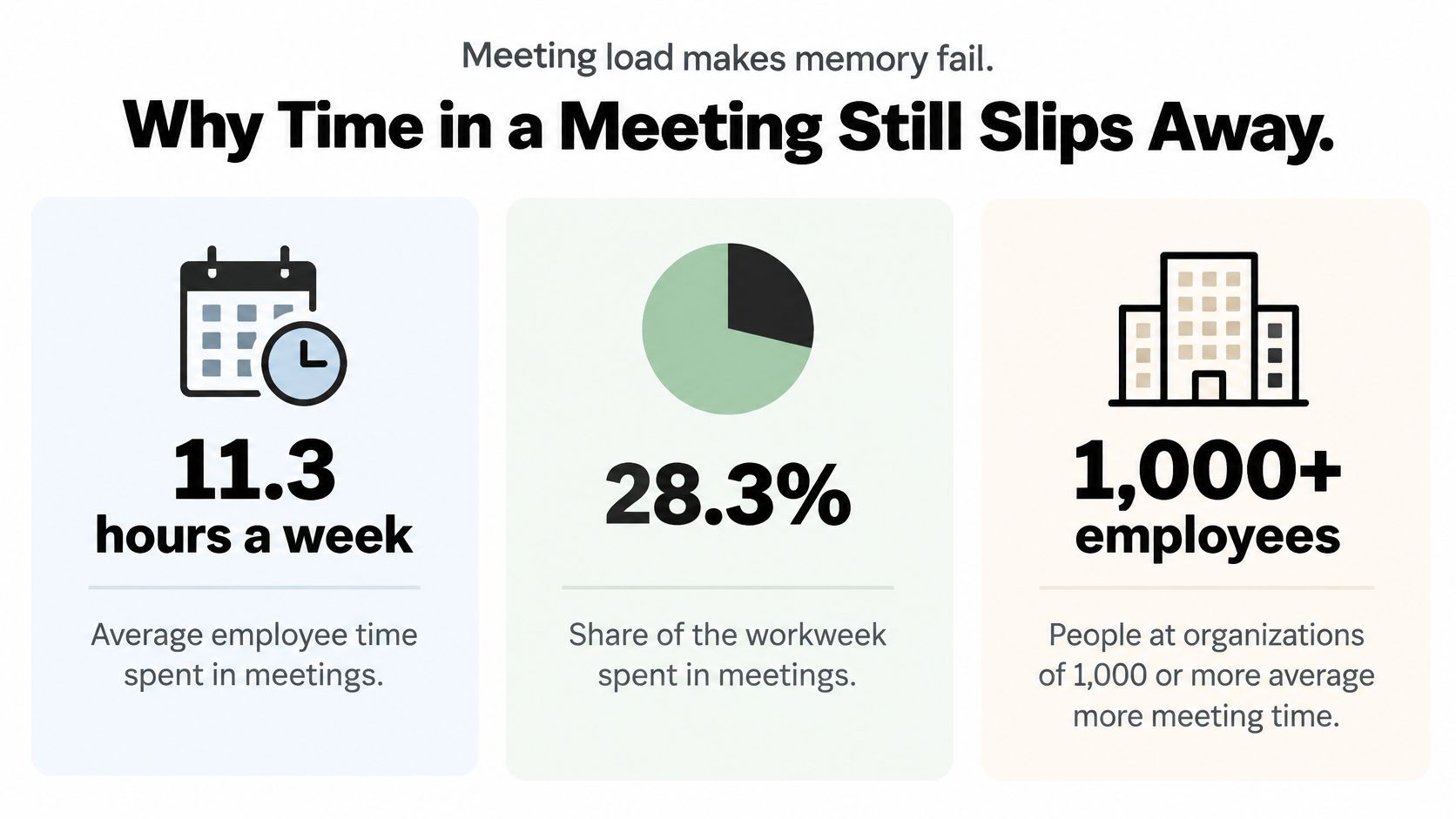
The average employee spends approximately 11.3 hours per week in meetings, equivalent to about 28.3% of the workweek, according to Fellow's meeting statistics. That's a substantial amount of spoken information to organize alongside everything else someone needs to remember.
Say you leave a study group remembering the final answer but not the explanation. A classmate corrected an assumption while you were writing, and the group moved on before you could ask why. Your notes preserve the conclusion without the part that would help you solve a similar problem.
The gap is between hearing information and being able to retrieve it. A lecture, office hour, or group discussion may contain an explanation that never appears in the slides.
The meeting-load infographic puts that capture problem in context.
The practical aim is to leave with searchable decisions, explanations, questions, and next steps. Choose your capture method according to which of those you'll need, rather than recording every conversation because you can.
What to Keep While You Are in a Meeting
| Method | What it preserves | Best when | Main weakness | How you review it |
|---|---|---|---|---|
| Live notes | Decisions, names, and your own questions | Short logistics or a meeting you already understand | Misses examples and exact wording | Scan the list the same day |
| Audio or video recording | Full spoken explanation and corrections | Lectures, study groups, and disputed decisions | Rewatching is slow and feels like studying | Mark moments, don't replay the whole file |
| Transcript | Searchable text, often with speakers and timestamps | Catch-up after joining late or studying a dense topic | Mixes chatter with conclusions | Search a phrase, then open the timestamp |
| Summary or study guide | Decisions, explanations, and open questions in short form | Exam review or briefing someone who missed it | Can drop nuance if unchecked against the source | Read once, then check claims against the transcript |
| Action list | Owners, deadlines, and next steps only | Project check-ins and group assignments | Ignores the reasoning behind the task | Convert each item into a task or a review prompt |
Match the method to what must survive
Live notes are the lightest option. If your group only needs to agree on who submits the assignment, a named owner and deadline may be enough. Write your own uncertainty beside the task so you don't mistake an incomplete understanding for a completed note.
Notes become less reliable when the explanation matters as much as the conclusion. While you're typing a definition, the instructor may explain an exception. A meeting-note structure can help you organize what you catch, but it can't preserve speech you missed.
A recording keeps the spoken sequence, including a correction that changes the meaning of an earlier statement. However, keeping the file doesn't give you a convenient way to find that correction. Mark useful moments during the session when possible.
A transcript makes the speech searchable. Look for speaker labels and timestamps, then check whether those labels are accurate. A sentence attributed to the wrong person can turn a student's guess into what looks like an instructor's explanation.
Practical rule: Preserve enough context to verify a claim, but don't treat everything captured as equally worth studying.
Choose the artifact you'll reopen
A summary or study guide is a review layer, not a replacement for the source. It should help you find the important material while leaving a route back to the original explanation.
For conceptual learning, turn a correction into a question you can answer without looking. For project work, turn an agreement into an action with a responsible person. Don't make flashcards from scheduling chatter or use an action list to represent a complicated argument.
In 2024, 65% of respondents said they regularly wasted time in meetings, according to Project.co's workplace survey as reported by MyHours. The response shouldn't be to capture everything with equal effort. Preserve the explanation, then identify what deserves another look.
Before your next session, pick a primary method from the table. Use notes for familiar logistics, recording plus transcription for explanations, and a checked review artifact when you'll need to study or brief someone else.
How to Record and Transcribe the Session
Set up capture before the discussion begins. Trying to fix permissions or microphone routing while someone explains a difficult concept divides your attention at the wrong moment.
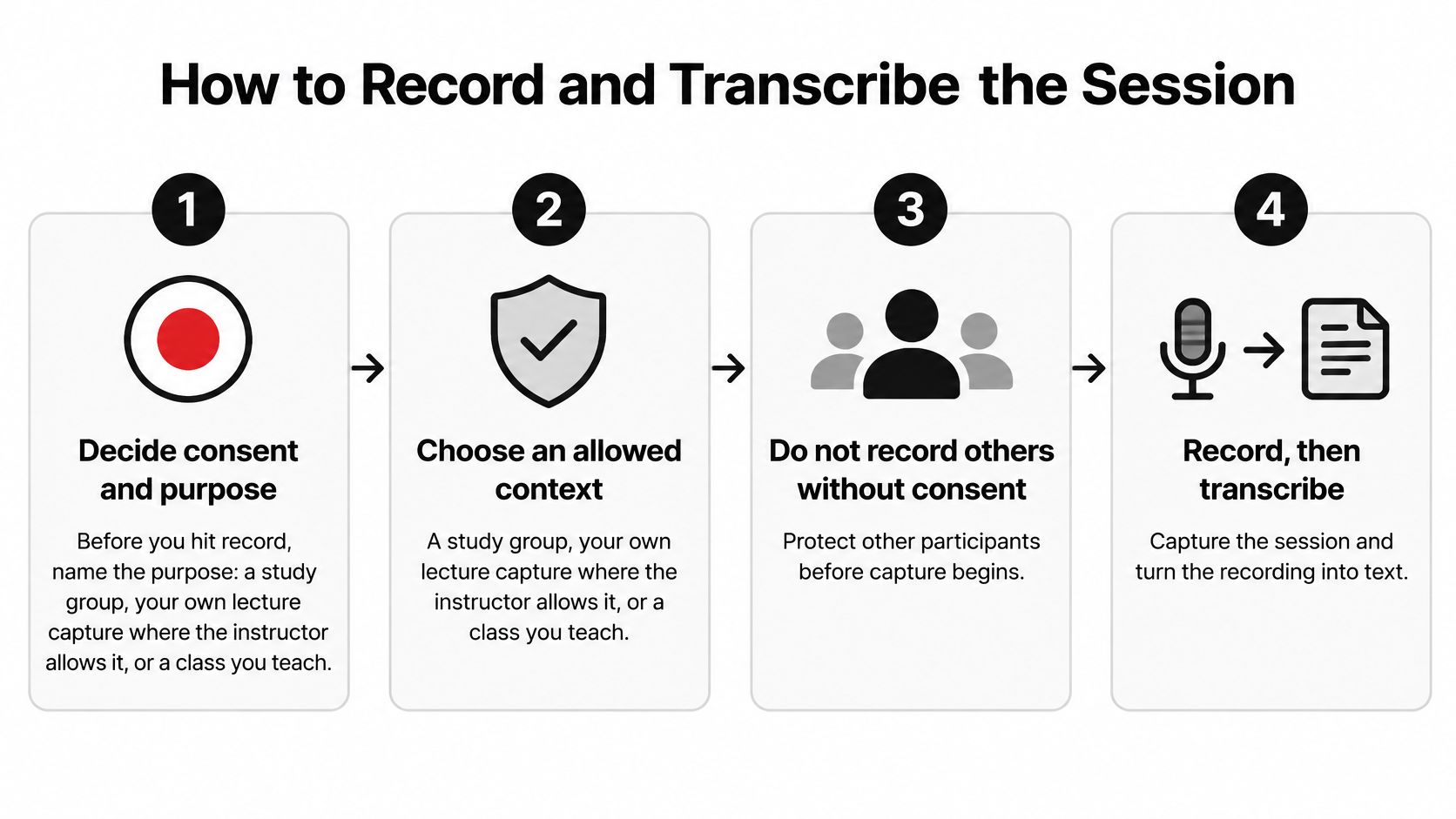
Use this visual reminder before starting a recording.
Follow a capture-to-text sequence
-
Agree on consent and purpose. Explain whether you're capturing a study group, an allowed lecture, or a class you teach. Don't secretly record other people, and don't assume permission to attend includes permission to record or distribute their speech. Use the guide to recording a meeting to think through permission before capture begins.
-
Check the audio source. In a room, position the microphone near the speaker and away from fan noise or objects that scrape across the desk. On Zoom, Google Meet, or Microsoft Teams, make sure you're capturing meeting audio rather than only your microphone. Test playback before relying on the setup.
-
Name the file for retrieval. Include the course or topic, session date, and session type. A filename such as Organic Chemistry, substitution review, study group is more useful than an automatically generated recording label. Keep the file in the relevant course folder rather than a general downloads pile.
-
Transcribe promptly. Process the recording while you still remember the topic and participants. Delaying makes it harder to recognize a misheard name or recover the context behind a shorthand remark.
-
Inspect a representative passage. Check the opening and a concept-heavy passage for missing speakers, technical vocabulary, and names. Pay particular attention to negations: dropping not can reverse an explanation. Correct important errors before generating study material.
-
Keep text connected to audio. Preserve timestamp links so you can hear the exact passage behind a confusing sentence. If the text reads strangely, listen before rewriting it into something that merely sounds plausible.
Match microphone advice to the speaker
If you're recording your own explanations or dictating corrections afterward, DragonSpeech's resource on a close-talk headset mic for Dragon provides context for that microphone setup. A microphone close to your mouth serves a different purpose from equipment intended to capture everyone around a table.
The video below offers an additional reference alongside the capture workflow.
Once readable text exists, stop treating capture as the main task. A raw transcript is still a conversation, complete with repetitions and unfinished thoughts. Your next job is to extract what deserves to survive.
How to Review Without Rewatching
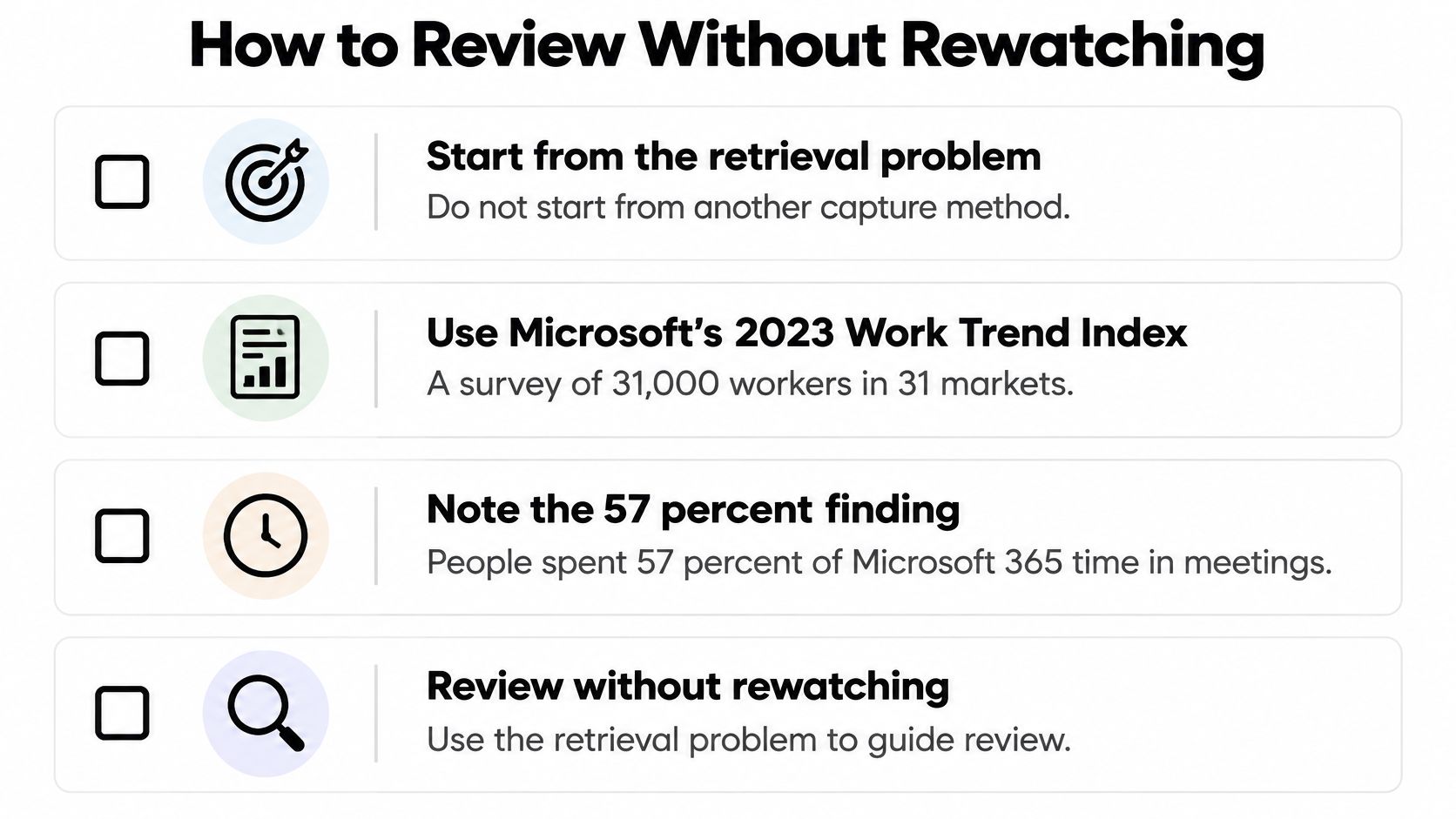
57% of respondents found it difficult to catch up after joining late, and 55% said next steps were unclear, according to Microsoft's 2023 Work Trend Index, based on an independent survey of 31,000 workers across 31 markets. Those are retrieval problems: someone needs a particular explanation or commitment, not just access to a file.
Start with the question you need answered. If you missed the assignment decision, search for the assignment name or submission requirement. If you're studying a mechanism, search for the reagent or the step you can't explain.
The checklist below emphasizes retrieval, but its communication-time figure includes meetings, email, and chat, not meetings alone.
Separate the record into usable fields
Build your review document around these distinctions:
- Decisions. Record what participants agreed to do or accept. A suggestion isn't a decision, and silence isn't enough evidence of agreement.
- Explanations. Preserve the reasoning, worked example, or correction that makes the conclusion understandable. Include the condition under which the explanation applies.
- Open questions. Keep unresolved issues visible. Note whether participants postponed the answer, disagreed, or never addressed it.
- Owners and deadlines. Write the responsible person and the stated due date. If either is missing, mark it as unassigned or unstated rather than supplying your own.
Link each entry to its supporting timestamp or, for accompanying documents, its page. The link should open close enough to the relevant passage that a reader can verify the wording without hunting.
Think of a voice memo and a lab notebook. The memo preserves the spoken sequence. The notebook identifies the observation, interpretation, and next procedure. A useful meeting summary needs that distinction between the source and your organized account of it.
An accurate review note can say that no decision was reached. It doesn't need to manufacture a conclusion to look complete.
Make a bounded same-day pass
Begin by scanning topic changes and searching the terms you marked during the session. Pull relevant passages into the appropriate field, then rewrite them concisely without strengthening what the speaker claimed.
Check surrounding context before finalizing an entry. A participant may propose an answer and withdraw it later. Search for the topic again and inspect the later discussion so an early guess doesn't become your final study note.
Finish with a question you still can't answer from the source. Make it specific enough for an instructor or group member to resolve: ask which assumption justifies a step, rather than saying the whole topic is confusing.
Leave unsupported fields blank. A useful record distinguishes what you know, what participants decided, and what still needs confirmation. It shouldn't conceal those differences behind a polished paragraph.
Two Sessions You Can Reuse Tomorrow
An organic chemistry study group
Consider a hypothetical 50-minute Zoom study group. During minutes 0–8, students arrange the next meeting and assign practice problems. Reduce that part to an action line rather than turning it into study cards.
During minutes 8–30, the group walks through a mechanism. At minute 22, a classmate points out that an earlier explanation assumed the wrong reaction conditions. Preserve the correction with its surrounding reasoning, then create two flashcards: one asking which condition matters, the other asking why the original explanation does not apply.
Notice what the timeline gives you. The raw recording would be 50 minutes of audio. The record you are building is three items long: an action line, a corrected mechanism, and a labeled decision.
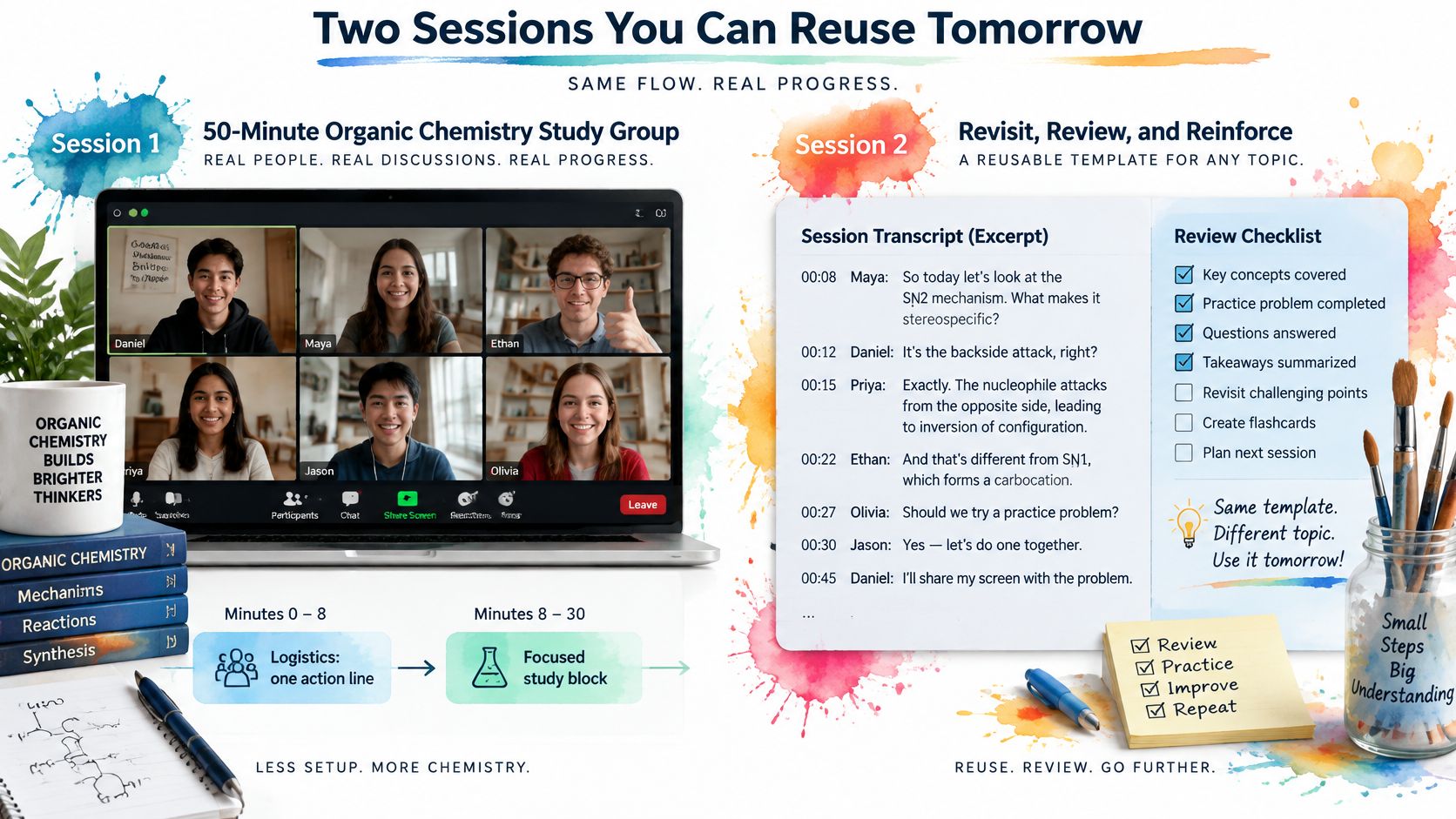
Minutes 30–50 cover a disputed practice problem. Record the answer the group accepted under decisions, but label it as a group conclusion pending confirmation against the course material. Agreement among classmates is not proof of correctness.
A student who joined at minute 18 can search the reagent name and inspect the earlier explanation. They do not need to interrupt the group for a complete restart.
The artifact left behind contains the review fields, the correction-based cards, and a timestamped question for the instructor. The question identifies the disputed assumption instead of merely asking whether the group's answer is right.
A coach teaching a weekly class
Now consider a coach teaching a class on Zoom. The coach demonstrates a technique, responds to questions, and adapts the explanation when learners misunderstand a step.
Afterward, the coach organizes the teaching explanation separately from student questions. An answered question belongs beside the relevant demonstration; an unresolved question belongs in a preparation list for the next class.
The coach can then:
- Revise the opening explanation where several questions exposed the same ambiguity.
- Prepare retrieval prompts from distinctions learners struggled to explain.
- Keep a timestamped follow-up question where the class needed more evidence or another example.
The final artifact again contains the review fields, practice cards, and a source-linked question. Its purpose is teaching preparation rather than exam revision.
None of this argues for cancelling useful live sessions. A heavy meeting load can wear down the value of live discussion over time, yet the sessions that remain worth holding still produce explanations, corrections, and decisions. For those sessions, the practical move is to convert the useful exchanges into knowledge someone can revisit. A late joiner, a slower processor, or a student reviewing next month each gets to verify the exact moment for themselves.
When Speaking Live Is the Hard Part
Attendance isn't the same as usable participation. Someone can remain in a meeting throughout the discussion and still have no workable opportunity to contribute.
That can happen when a person processes speech slowly, has hearing loss, communicates in a second language, is neurodivergent, or can't secure a turn. Qualitative research on listening effort in video meetings identifies turn-taking, audio clarity, accessibility tools, meeting size, and opportunities to hear as relevant factors. A transcript alone doesn't address all of them.
A person who needs time to formulate a response shouldn't lose the opportunity to contribute when the live conversation ends.
Make contribution possible before and after the call
Share preparation material in advance. Publish the reading, proposed decision, or question participants will discuss. Distinguish a proposal from a settled decision so advance access doesn't become an announcement that debate is already closed.
Use a predictable participation pattern:
- Keep labels consistent. Use Decision, Question, and Action in the shared document each time. A reader shouldn't have to decode a new note-taking system for every session.
- Offer a written route during discussion. Invite chat contributions or shared-document comments. Assign someone to bring those contributions into the conversation so they aren't left unread.
- Publish a correction route afterward. Share source-linked conclusions and explain where participants can flag an inaccurate attribution or incomplete account.
- Accept questions formed after review. Let participants inspect the explanation and submit a focused question without treating delayed processing as lack of preparation.
These moves don't require everyone to participate in the same way. A learner might speak during a familiar topic and use written follow-up when the material becomes dense.
Give unresolved questions a home
For a study group, create a shared document titled Unresolved. Each entry should identify the topic, link to the relevant moment, and state what would resolve the uncertainty.
Don't use the document as an unmonitored suggestion box. Name who will check it and how an answer will return to the group. Otherwise, you've offered a channel without offering a response.
Speaker attribution also needs care. If a transcript assigns a comment incorrectly, allow the participant to correct the record without defending themselves against an automated label.
The practical test is straightforward: someone who never spoke should still be able to verify what was decided and contribute a correction. Recording helps preserve the conversation; a deliberate participation process gives people a fair way to influence its outcome.
Make the Next Session Searchable
Choose a lecture, study group, or class this week that you'd otherwise expect to replay. Define the output before it starts: a review sheet you can study from, a checked explanation, or an action record someone else can follow.
Finish with something you'll reopen
- Choose the source deliberately. Capture the explanation you'll need, with consent, rather than accumulating unrelated recordings.
- Check the result. Verify names, numbers, and commitments against the audio before relying on generated notes.
- Set a stopping point. Finish when you have a usable review artifact and a clear unresolved question, not when you've consumed the recording again.
Our ClassLecture.ai workflow lets you select a Zoom, Google Meet, or Microsoft Teams class source in desktop Chrome or Edge and save its audio without adding a meeting participant. Record or upload the session, get a searchable timestamped transcript, and study with answers tied to exact lecture moments; a 1-hour lecture is typically transcribed in about 5 minutes. Transcripts and answers aren't guaranteed to be accurate, complete, or to improve grades.
If you also teach paid sessions, BlokNotes' guide to checking meeting history and billable work offers a separate operational reference. Keep that administrative record distinct from what learners need to understand.
Turn your next permitted recording into material you can review. Visit ClassLecture.ai to record or upload a session, search its timestamped transcript, and create study guides, flashcards, or questions grounded in your class materials. Check the supporting lecture moments before adding the results to your study routine.
The ClassLecture.ai Team
We build ClassLecture.ai, the AI study assistant that turns your recorded lectures into transcripts, summaries, flashcards, and answers cited to the exact timestamp — so you learn faster from your own professor's words.
Keep reading
How to Record Meeting and Transcribe Without an Account
Learn how to record meeting and transcribe sessions in your browser. Step-by-step guide covering audio quality, privacy, and turning transcripts into searchable
ReadMeeting Recording Transcription Free: 10 Tools Compared
Compare 10 meeting recording transcription free tools: plan limits, bot-free capture, transcript quality, and privacy trade-offs before you choose.
ReadHow to Record a Meeting for Better Study Notes
Learn how to record a meeting with clear audio, handle consent, and turn live sessions into interactive study guides and flashcards using ClassLecture.ai.
Read